Evidence guide · United States federal rules, with state variations
Are screenshots admissible in court? Sometimes. Less often than you think.
No rule excludes screenshots as a category. They get in when a witness can testify that the image fairly and accurately shows what they saw, and nothing suggests manipulation. They fail when the only thing behind them is that somebody produced them, and courts have said so in published decisions.
This page walks the actual rules, fourteen decisions with full citations, the three competing state approaches, the position in England and Wales, Canada and Australia, and what to do when a screenshot is all you have.
Nothing on this page is legal advice. It is a practitioner's map of the rules and the reported decisions, written by the team that builds a capture tool. The bias that implies is stated openly.
If you only have a screenshot, keep reading. There is a whole section on making one as defensible as it can be, and it does not require buying anything.
screenshot.png
What the file carries
size 1.2 MB
created whenever the OS says
source URL
server response
verified capture time
integrity record
Everything else has to come from the witness who took it, months later, under cross-examination.
The difference is not image quality. It is whether the exhibit can speak for itself when the witness is unavailable or their memory is challenged.
Every package can be verified by anyone, for free, in the open Trust Verifier.
Quick answer
Are screenshots admissible in court?
Sometimes. No rule excludes screenshots as a category. One is admissible when the proponent satisfies Federal Rule of Evidence 901(a) and survives a Rule 1002 best evidence objection, usually through a witness with personal knowledge. A ProofSnap capture that records the URL, the server response, an NTP-verified time and a hash of every file supplies that corroboration instead.
Courts have refused screenshots on exactly that basis, and authentication is only the first hurdle: an exhibit still has to clear relevance, hearsay and best evidence. This page is a practitioner's map, not legal advice, and jurisdictions differ in ways that decide real cases.
The four hurdles, in the order they come up.
Most writing on this topic collapses everything into the word admissible, which hides the fact that a screenshot has to clear several separate hurdles and can fall at any of them. Knowing which one you are arguing about is half the work.
“To satisfy the requirement of authenticating or identifying an item of evidence, the proponent must produce evidence sufficient to support a finding that the item is what the proponent claims it is.”
Read that sentence closely, because the whole argument sits in it. The rule does not ask whether the item is genuine, it asks whether the proponent has produced evidence supporting a finding that it is. A screenshot on its own produces none: the file says nothing about where it came from, when it was made, or whether it has changed. Everything supporting it has to come from a witness, and a witness can be unavailable, mistaken or disbelieved.
Authentication, Rule 901
Rule 901(a) requires evidence sufficient to support a finding that the item is what the proponent claims. The bar is low in theory, and courts describe it as a threshold rather than a verdict on genuineness. Rule 901(b)(1) allows testimony from a witness with knowledge, which is how most screenshots get in: someone who saw the page says the image fairly and accurately depicts it. Rule 901(b)(4) allows authentication by appearance, contents, substance, internal patterns, or other distinctive characteristics taken together with all the circumstances, and that is the provision a forensic capture is built to satisfy, because the URL, the server response, the certificate and the hash are exactly such characteristics. Our detailed guide to authenticating a screenshot under Rule 901 works through all three illustrations and the state split on social media.
Best evidence, Rules 1001 to 1003
Rule 1002 requires an original to prove the content of a writing, recording or photograph. Rule 1001(d) helps by treating any printout or output readable by sight that accurately reflects electronically stored information as an original, and Rule 1003 admits a duplicate unless a genuine question arises about authenticity or admission would be unfair. The pressure point is the phrase accurately reflects. A screenshot that truncates a thread, hides comments behind a fold, or omits the metadata a reader would need does not obviously accurately reflect anything. That is the reasoning in Edwards v. Junior State of America Foundation, No. 4:19-cv-140-SDJ (E.D. Tex. Apr. 23, 2021), where the court required native format or a properly processed image inclusive of metadata.
Hearsay, Rules 801 to 807
Authenticating a screenshot says nothing about whether its contents may be offered for their truth. A post offered to prove that the poster did the thing described is hearsay unless it is a party admission under Rule 801(d)(2), falls within an exception, or is offered for a non-hearsay purpose such as notice, state of mind, or the fact that a statement was made at all. Plenty of practitioners solve authentication and then lose the exhibit on hearsay, which is an avoidable order-of-operations problem.
Relevance and balancing, Rules 401 and 403
The exhibit still has to make a fact of consequence more or less probable, and its probative value must not be substantially outweighed by unfair prejudice, confusion or waste of time. A single cropped frame that invites the jury to infer far more than it shows is the classic Rule 403 target, quite apart from anything technical.
The shortcut most guides skip
“Data copied from an electronic device, storage medium, or file, if authenticated by a process of digital identification, as shown by a certification of a qualified person that complies with the certification requirements of Rule 902(11) or (12).”
Rules 902(13) and 902(14), added by the December 2017 amendments, let a record generated by an electronic system, or data identified by a hash value, be self-authenticating on a written certification made in the manner of Rules 902(11) or 902(12). That removes the need to put a foundation witness on the stand for facts nobody genuinely disputes. It does not remove the human: the certification has to be made by a qualified person, which is why no software produces a finished 902(14) certificate. Software produces the facts; a person signs and subscribes them under penalty of perjury pursuant to 28 U.S.C. 1746. Our detailed guide to self-authenticating web evidence under FRE 902(13) and 902(14) covers what the certification must actually say, the notice requirement both subsections inherit, and where self-authentication stops.
Reported decisions, full citations
Five times a screenshot or printout did not get in.
Read them in full before relying on any of them. Each is summarized here for orientation, not as a substitute for the opinion.
Moroccanoil, Inc. v. Marc Anthony Cosmetics, Inc.
57 F. Supp. 3d 1203 (C.D. Cal. 2014)
Trademark dispute. The plaintiff offered Facebook screenshots. The court would not receive them, because there was no way to establish that the images were an accurate representation of the live page. The content was not shown to be false; the form in which it was offered simply could not support a finding that it was what it was claimed to be.
Linscheid v. Natus Medical Inc.
2015 WL 1470122 (N.D. Ga. Mar. 30, 2015)
Employment matter. A LinkedIn profile page, printed from the internet and offered with a declaration from the person who printed it, was not authenticated. The declaration established who pressed print, not that the page was what it was claimed to be. A useful reminder that a sworn statement about the act of capture is not the same as evidence about the artifact.
United States v. Vayner
769 F.3d 125 (2d Cir. 2014)
Criminal appeal. A printout of a social networking profile page was admitted below and the Second Circuit reversed, holding the government had produced insufficient evidence that the page was the defendant's profile rather than one he neither created nor controlled. Matching biographical details on the page were not enough, because nothing showed the defendant had put them there.
Commonwealth v. Mangel
181 A.3d 1154 (Pa. Super. 2018)
The Superior Court affirmed the exclusion of Facebook posts and messages, holding that authentication of social media evidence is evaluated case by case and that the proponent must present direct or circumstantial evidence corroborating the identity of the author. Ownership of an account is not authorship of a post. This is the decision to have ready whenever an exhibit rests on a matching name and a profile photograph.
Weinhoffer v. Davie Shoring, Inc.
23 F.4th 579 (5th Cir. 2022)
Contract dispute turning on auction terms published on a website. The Fifth Circuit held that an Internet Archive Wayback Machine capture was not self-authenticating and not a proper subject of judicial notice, noting that the archive's own terms disclaim guarantees of accuracy. Testimony from someone with personal knowledge of the archive's reliability would have been required. Relevant to anyone who assumes an archive link solves the date problem.
And the other direction, so the picture is honest
Social media evidence gets admitted constantly. Tienda v. State, 358 S.W.3d 633 (Tex. Crim. App. 2012) held that circumstantial evidence, including the content of the pages themselves, could allow a reasonable juror to find the profiles were the defendant's. Parker v. State, 85 A.3d 682 (Del. 2014) adopted that approach for Delaware over the stricter Maryland rule. Sublet v. State, 442 Md. 632, 113 A.3d 695 (2015) moved Maryland itself toward the reasonable juror formulation. United States v. Browne, 834 F.3d 403 (3d Cir. 2016) sustained admission where extrinsic evidence tied the account activity to the defendant.
The pattern across both groups is consistent and not really about screenshots at all: exhibits succeed when something outside the image ties the content to a person and a moment, and fail when the image is asked to do that work alone. A forensic capture supplies part of that something automatically. The rest still has to be built.
All fourteen decisions, sortable, with full citations and what each one actually held →
The split that decides cases
Three approaches to authenticating social media.
Courts have not agreed on how much extra scrutiny social media deserves. Which approach your forum follows changes what you need before you walk in.
Approach 1
Greater scrutiny
Griffin v. State, 419 Md. 343, 19 A.3d 415 (2011)
Maryland's Court of Appeals applied heightened scrutiny to internet-derived evidence, reasoning from the heightened possibility of manipulation, and pointed to methods such as testimony from the creator, examination of the device, or information obtained from the platform itself. The most demanding of the three, and the one most often cited by opponents of an exhibit.
Approach 2, most common
Reasonable juror
Tienda v. State, 358 S.W.3d 633 (Tex. Crim. App. 2012); Sublet v. State, 442 Md. 632 (2015)
Circumstantial evidence suffices if a reasonable juror could find the item authentic. Distinctive content, references only the purported author would know, and the surrounding pattern all count. Maryland itself moved here in Sublet, and Delaware adopted the Texas reasoning in Parker v. State, 85 A.3d 682 (Del. 2014).
Approach 3
Conventional rule, applied strictly
United States v. Vayner, 769 F.3d 125 (2d Cir. 2014)
No special social media rule, but the ordinary Rule 901 requirement applied without slack. Vayner declined to decide whether a heightened standard should apply and still reversed, because the proponent had not connected the page to the defendant at all. In practice this often lands close to Griffin.
What all three have in common is that they reward evidence external to the image. That is why the practical answer is the same whichever approach governs: capture in a form that carries corroborating detail, and build authorship from the record rather than from the exhibit.
Outside the United States
England and Wales, Canada, Australia.
Most writing on this subject is United States federal practice with no signposting, which quietly misleads everyone else. The three other major common law regimes reach a similar destination by different routes, and in two of them the statute is more explicitly friendly to a documented collection method than the Federal Rules are.
| United States | England and Wales | Canada | Australia | |
|---|---|---|---|---|
| Governing text | FRE 901, 902, 1001-1003 | Civil Evidence Act 1995; CPR Pt 32, PD 57AD, PD 31B | Canada Evidence Act ss. 31.1-31.5, plus provincial Acts | Evidence Act 1995 (Cth) ss. 48, 51, 146, 147 |
| Main battleground | Admission. Authentication under 901 is a real gate. | Weight. Hearsay abolished in civil, so it comes in and is then discounted. | Integrity of the system that recorded or stored it. | Whether the presumption about the process applies. |
| Is an original required? | Rule 1002, but 1001(d) treats an accurate printout of ESI as an original | No. s. 8 allows a copy, however many times removed | No. s. 31.2 substitutes proof of system integrity | No. s. 51 abolished the rule outright |
| Is there a shortcut for a documented process? | Yes, 902(13) and 902(14) on a certification by a qualified person | No formal shortcut; a clear method improves weight under s. 4 | Yes, s. 31.3 presumption, and s. 31.5 lets you lead the standard used | Yes, s. 146, but note the s. 147 carve-out for litigation-created documents |
| What actually helps | The same thing in all four: a record that carries its own source, time and integrity, plus a written account of the method that produced it. | |||
England and Wales
Civil Evidence Act 1995 · CPR PD 57ADThe framing is different enough to catch out anyone reasoning from United States practice. Section 1(1) of the Civil Evidence Act 1995 abolished the rule against hearsay in civil proceedings, and section 8 allows a statement in a document to be proved by producing the document or a copy of it, no matter how many times removed, authenticated in whatever manner the court approves. So a screenshot is not fighting for admission the way it does in a United States court.
The fight moves to weight. Section 4 sets out what the court considers when deciding how much weight hearsay deserves, including whether it would have been reasonable to produce the maker of the statement, whether the original was contemporaneous, and whether any person involved had a motive to conceal or misrepresent. An unexplained screenshot is admitted and then given very little weight.
On the procedural side, a document means anything in which information of any description is recorded, which plainly reaches social media and electronic communications. Disclosure in the Business and Property Courts runs under Practice Direction 57AD, in force since 1 October 2022, with PD 31B governing electronic documents elsewhere, and metadata is disclosable alongside native documents. Producing a flattened image where a native document with metadata exists is therefore a disclosure question as much as an evidential one.
Canada
Canada Evidence Act ss. 31.1-31.5Canada legislated this directly, and the wording rewards a forensic method more explicitly than any other regime here. Section 31.1 puts the burden on the person seeking to admit an electronic document to prove its authenticity by evidence capable of supporting a finding that it is what it is purported to be, which reads very close to Federal Rule 901(a).
The interesting part is section 31.2. The best evidence rule for an electronic document is satisfied on proof of the integrity of the electronic documents system in which it was recorded or stored, rather than by producing an original. Section 31.2(2) adds that a printout satisfies the rule where it has been manifestly or consistently acted on, relied on or used as a record. Section 31.3 then presumes system integrity, absent evidence to the contrary, where the system was operating properly, or the document was recorded by the opposing party, or by a third party in the usual and ordinary course of business.
Section 31.5 is the provision to know: evidence may be led about any standard, procedure, usage or practice concerning how electronic documents are recorded or stored. That is an open invitation to put the collection method itself in evidence, which is exactly what a documented, hashed, logged capture is for. Provincial evidence statutes carry closely parallel provisions.
Australia
Evidence Act 1995 (Cth) and uniform state ActsThe uniform evidence legislation removed the problem at the root. Section 51 abolished the common law original document rule, and section 48 allows the contents of a document to be proved by tendering a copy, an extract or a summary, among other routes. The Act avoids the word original altogether, which sidesteps the argument about whether a capture is an original or a duplicate.
Two presumptions then do real work. Section 146 presumes that where a document or thing was produced by a device or process that, if properly used, ordinarily produces a particular outcome, it did produce that outcome on that occasion, unless evidence sufficient to raise doubt is adduced. That is directly on point for a capture tool: show what the process ordinarily does, and the presumption carries the rest.
The trap. Section 147, the business records version of the same presumption, expressly does not apply to a document produced for the purpose of, or in contemplation of or in connection with, a proceeding, or in connection with an investigation leading to a criminal proceeding. Evidence captured for the litigation is precisely the category it excludes. Practitioners who reach for section 147 because the phrase business records sounds right will be met with that carve-out. Section 146 is the provision that helps here, and the evidence about what the process ordinarily does has to be led.
The convergent point
Four regimes, four different doctrinal routes, one practical conclusion. Whether the question is framed as authentication under Rule 901, as weight under section 4 of the Civil Evidence Act, as system integrity under section 31.2 of the Canada Evidence Act, or as a presumption about a process under section 146 of the Evidence Act 1995, the thing that answers it is the same: an artifact that records where it came from, when it was taken and whether it has changed, together with a written account of the method that produced it. Collect once, properly, and the exhibit travels across all four.
Statutory references are to the position as published at the time of writing and are given for orientation. Scotland and Northern Ireland differ from England and Wales, Canadian provincial statutes differ in detail from the federal Act, and the Australian uniform legislation is adopted with variations by state. Consult qualified counsel in your own forum.
Three ways to get the content
Screenshot, platform export, forensic capture.
Most guides on this topic compare these three and stop before the price, because the tools they sell are quoted on a call. Here are the numbers.
| Screenshot | Platform export or subpoena | Forensic capture | |
|---|---|---|---|
| Source URL recorded | No, unless you photograph the address bar | Yes | Yes, as requested and as resolved |
| Independent capture time | No, only the file date the OS will change | Platform's own record | NTP verified, anchored in Bitcoin, optional eIDAS qualified timestamp |
| Integrity provable later | No | Depends on the custodian declaration | SHA-256 per file, RSA-4096 signed manifest |
| Works on someone else's account | Yes, public content | Only through legal process | Yes, public content |
| Time to obtain | Seconds | Days to months | About 41 seconds |
| Cost | Free, and it can cost you the exhibit | Counsel time, court fees | $4.99 for 10 captures, or $18.99 per seat per month |
| Verifiable by the other side | No | Through the producing party | Yes, offline, with python3, openssl and an ots client |
The three are not mutually exclusive. The strongest position is a forensic capture on the day of discovery, followed by legal process for the platform record if the matter goes the distance. The capture protects you against the content disappearing while the process runs.
No tool, no budget, no time
If a screenshot is all you have, do these seven things.
This raises the floor. It does not solve the problem, and we are not going to pretend it does. But most people reading this page are about to take a screenshot anyway, and there is no reason for it to be a bad one.
-
1
Capture the whole window
Include the address bar showing the complete URL and the system clock. A cropped image of the interesting part throws away the only two contextual facts a screenshot can carry.
-
2
Hash the file immediately
Run sha256sum or Get-FileHash the moment you save it, and record the value somewhere durable. A hash recorded only on the same laptop proves little, so email it to yourself, put it in the matter file, or post it somewhere with an independent timestamp.
-
3
Save the page source and print to PDF as well
Three artifacts of the same page are meaningfully better than one, because they can be compared against each other. The HTML in particular often preserves timestamps and identifiers that the rendered view hides.
-
4
Write the note while you are still looking at the screen
Who captured it, exact date and time with time zone, device, operating system, browser and version, the URL, the steps taken, and whether you were logged in to anything. That contemporaneous note becomes your Rule 901(b)(1) foundation eighteen months later, when your memory of a routine Tuesday is worth nothing.
-
5
Capture the context, not the highlight
The whole thread, the whole profile, the comments, the preceding and following posts. Opposing counsel will argue the crop changed the meaning, and the cheapest way to lose that argument is to have cropped.
-
6
Never touch the original file
No cropping, no annotation, no re-saving, no converting to another format, no dropping it into a document and pulling it back out. Work on copies and keep the original bit for bit as captured, because the hash you recorded in step 2 is only worth something if the file still matches it.
-
7
Send a preservation letter if litigation is reasonably anticipated
A screenshot is a copy of something that still exists somewhere. Putting the other side on notice of a duty to preserve is what turns later deletion into a spoliation problem for them rather than an evidence problem for you.
The tool itself
This is the whole interface.
No dashboard, no case management system, no onboarding call. A side panel in Chrome or Edge with one button that matters, which is the point: the collection method has to be simple enough that it actually gets used on the day the content is found.
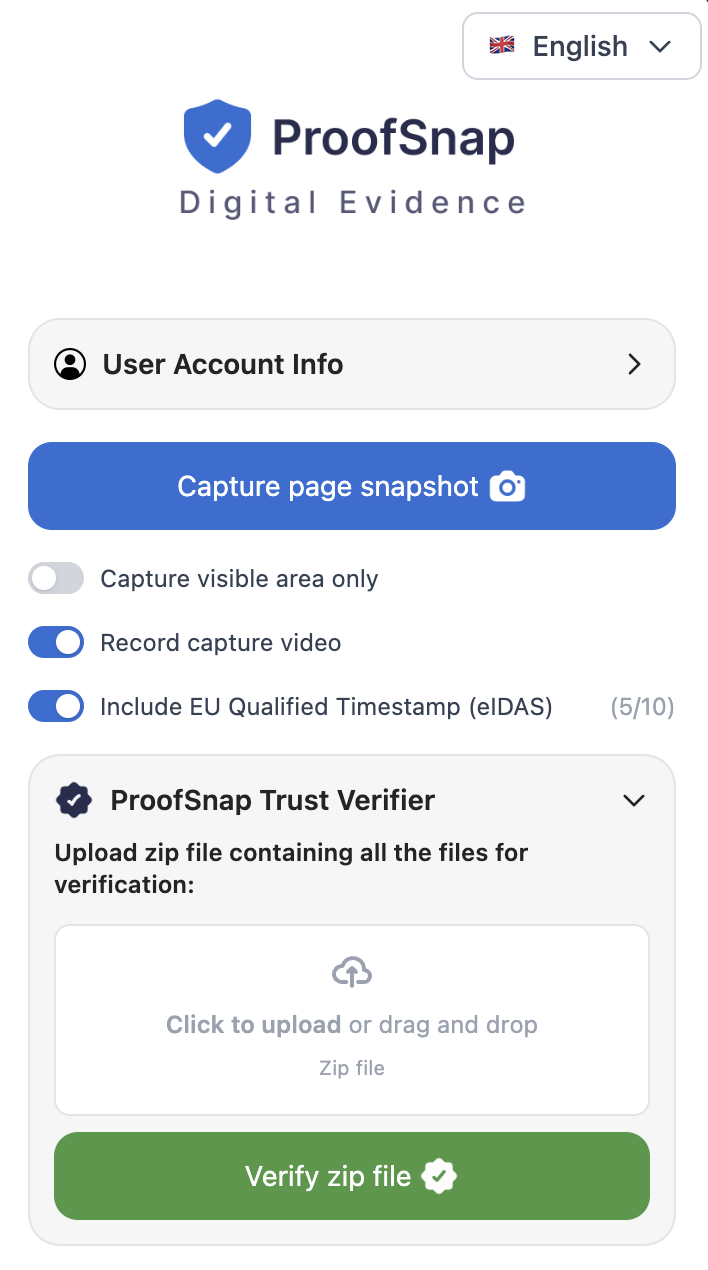
The side panel, actual size relative to a browser window.
Capture page snapshot
The one button that does the work. Scrolls and stitches the full page, saves the HTML as served and the DOM text, records the response headers, DNS, WHOIS and TLS, checks the clock against NTP, hashes everything and signs it. About 41 seconds.
Case and examiner details
Optional matter reference and examiner identity, written into the evidence PDF and the chain of custody so the package identifies the file it belongs to without a covering note.
Evidence language
The evidence PDF can be exported in a different language from the interface, which matters when the investigator and the tribunal do not share one. The structured JSON files stay in their standard form for verification tooling.
Whitelabel branding
A toggle, not a professional services engagement. Your logo, color, firm name, address and contact email replace the default header on the evidence PDF. Enterprise, and the administrator on the Company plan.
Record capture video
Records the capture as it happens and puts the recording inside the sealed package, which answers the question of what the operator did between opening the page and producing the file.
EU qualified timestamp
One toggle adds an eIDAS qualified RFC 3161 timestamp from Disig a.s., a Qualified Trust Service Provider on the EU Trusted List. The counter shows the remaining allowance on the plan.
Trust Verifier and File Certifier sit in the same panel. The verifier checks any ProofSnap package, including one somebody else produced, so the receiving side can validate without installing anything of their own. The certifier seals files you already hold, such as an export, a photograph or a PDF, rather than a web page. Nothing here needs configuration before the first capture.
Do not take our word for it
Download a real evidence package and break it yourself.
Every other vendor writing about this topic asks you to book a demo before you can see the deliverable. Here is the actual ZIP. Open it, read the manifest, recompute the hashes, check the signature against the public key, then change one byte in the screenshot and watch the verification fail. That takes about five minutes and tells you more than any demo call.
unzip proofsnap-sample-evidence-package.zip -d sample && cd sample
sha256sum -c <(python3 -c "import json;[print(v+'  '+k) for k,v in json.load(open('manifest.json'))['files'].items()]")
openssl dgst -sha256 -verify publickey.pem -signature manifest.sig manifest.json
bash verification/verify.shThe exact commands are in verification/VERIFICATION_GUIDE.txt inside the ZIP. Nothing in the verification path runs through ProofSnap.
The questions behind this search
FAQ
Stop arguing about the exhibit. Capture one that argues for itself.
Install the extension, capture one page, open the ZIP and run the verification script. Five minutes tells you more than any demo call, and the sample package is free to download without signing up for anything.
Start the 7-day trialCredit card required. Cancel any time during the trial at zero cost. Or buy a $4.99 SnapPack for 10 captures with no subscription and no auto-renewal.
Disclaimer: This page provides general information about the admissibility and authentication of screenshots and other digital evidence under the United States Federal Rules of Evidence, with notes on state variations and on the position in England and Wales, Canada and Australia. It is not legal advice and does not create an attorney-client relationship. ProofSnap is not a law firm and does not act as an expert witness. Case summaries are provided for orientation only and should be read in full before being relied on; several turn on facts and procedural posture that a summary cannot convey. Rules and their interpretation differ by jurisdiction and change over time. Consult qualified counsel in your forum.
Related ProofSnap pages
- Social media evidence case law all 14 decisions, sortable
- How to preserve social media evidence the full workflow
- Are WhatsApp screenshots admissible? the messaging-specific version
- Evidence for law firms self-authentication under FRE 902(14)
- Social media evidence for insurance SIU
- Workers comp social media evidence
- Trust Verifier check any package in the browser
External references
- FRE 901, authenticating or identifying evidence
- FRE 902, evidence that is self-authenticating
- FRE 1002, the best evidence rule
- American Bar Association, screenshots as evidence
- Federal Judicial Center, the 2017 self-authentication amendments
- 28 U.S.C. 1746, unsworn declarations
- Parker v. State, 85 A.3d 682 (Del. 2014)
- Commonwealth v. Mangel, 181 A.3d 1154 (Pa. Super. 2018)
- NAAG, three approaches to authenticating social media
- Civil Evidence Act 1995 (England and Wales)
- Canada Evidence Act, s. 31.2
- Evidence Act 1995 (Cth), Australia