How to verify an OpenTimestamps (.ots) file
To verify an OpenTimestamps (.ots) file, drop the proof and the original document at opentimestamps.org. A result naming Bitcoin block 925847 proves the file existed before that block was mined and has not changed since. It takes 30 seconds and costs nothing. As of 2026, ProofSnap evidence packages can be verified in a single step with the free Trust Verifier.
Received a full evidence ZIP? A ProofSnap evidence package is verified in one step: the timestamp, every SHA-256 hash and the digital signature are checked together in the free Trust Verifier.
No account, no install, nothing uploaded. Verification runs locally in your browser and works for anyone: you, your lawyer, the court and the opposing side.
30 seconds · 3 free methods · Verifiable by anyone, forever
Verify a timestamp
Two files, nothing uploaded
manifest.json.ots
Timestamp proof · 812 bytes
manifest.json
The original file · 4.1 KB
SHA-256 recomputed in your browser
9f2c4b1e8a07d3…c65e0b
Illustrative example. A court, an expert or the opposing side can check the block number and the block time independently.
A ProofSnap evidence package can be verified by anyone, for free, in the public Trust Verifier.
Quick answer
How do I verify an OpenTimestamps (.ots) file?
Go to opentimestamps.org, drop the .ots file, then drop the original document. If you see a line such as Bitcoin block 925847 attests existence as of 2025-11-30, the proof is valid: the document existed on or before that date and has not been altered since. Free, instant, and nothing leaves your computer. For a ProofSnap evidence ZIP, use the Trust Verifier instead, and everything is checked in one step.
What it proves: the file existed in that exact state no later than the block time, and has not changed since. What it does not prove: that the content is true, or who created it. ProofSnap is an evidence tool, not legal advice.
What is an .ots file, and how do you open it?
An .ots file is a digital timestamp receipt created by the OpenTimestamps protocol. It works like a notary stamp, proving that a specific document existed before a certain date, except that the witness is the Bitcoin blockchain rather than a person. The file is tiny, free to create, and anyone can check it independently.
You do not need special software to open it, and you do not need to understand Bitcoin or cryptography. The .ots file is not meant to be read by a human: it is fed to a verifier together with the file it belongs to. Follow the online method below and you are done in half a minute.
Got a ZIP with an .ots inside? If you received a ProofSnap evidence package (a ZIP with the screenshot, HTML, metadata and the proof), skip to verifying the whole package. It checks the timestamp, the hashes and the signature together, with no need to extract anything. If somebody sent you a plain screenshot instead, read why a regular screenshot fails in court before you rely on it.
Method 1, the easy one
Verify an OpenTimestamps file online, in 30 seconds
Two files, one page, nothing to install and no account. This is the method to use unless you are a developer or you hold a full ProofSnap evidence package.
Open the verifier
Go to opentimestamps.org or to dgi.io/ots. Both are free and both do the same job.
Drop both files
First the .ots proof, then the original document that was timestamped. From a ProofSnap package, extract the ZIP and use manifest.json.ots and manifest.json.
Read the result
A block number and a date mean the proof is valid. Anyone can repeat this check, at any time, without asking you or ProofSnap for anything.
What a successful result looks like
Your document existed on or before that date and has not been modified since. The attestation comes from the Bitcoin blockchain, a global network of thousands of independent computers. No company, no server and no person is trusted in the process.
The block number is the part you can check yourself. Bitcoin block 925847, used as the example throughout this guide, was mined at 10:46 UTC on 30 November 2025, and any block explorer will confirm that time. A timestamp that names a block is therefore falsifiable, which is exactly what makes it evidence rather than an assertion.
Privacy: everything runs in your browser. No files are uploaded to any server, so a confidential document stays on your computer while you verify it.
# result
Success! Bitcoin block 925847
attests existence as of 2025-11-30
Method 2, for a whole evidence package
Verify a ProofSnap evidence package in one step
A timestamp on its own answers only one question. An evidence package answers all of them at once: what the content was, who sealed it, and when. The Trust Verifier checks all of it.
A ProofSnap evidence package holds 11 to 15 files depending on the plan: 11 on Essential, 12 on Professional, 15 on Enterprise and Company. The Trust Verifier re-checks every one of them in the browser, including the SHA-256 hash of each file, the RSA-signed manifest, the OpenTimestamps proof, the eIDAS qualified timestamp where present, and the chain of custody recorded in line with ISO/IEC 27037.
- 1Open getproofsnap.com/verify.
- 2Drop in the evidence ZIP exactly as you received it, with nothing extracted or renamed.
- 3Read the report. Every check is listed separately, so a failure tells you which part of the package is at fault.
What gets checked
- SHA-256 hash of every file, recomputed and compared to the manifest (integrity)
- RSA signature over the manifest (authenticity)
- OpenTimestamps proof against the Bitcoin blockchain (time)
- eIDAS qualified timestamp with offline long-term validation, when present
- Chain of custody in line with ISO/IEC 27037
The ZIP is never uploaded. Only the timestamp proofs and the manifest are sent for the timestamp check, no account is needed and it costs nothing. Lawyers, judges and opposing counsel can verify the evidence for themselves without installing anything.
Method 3, for developers
Command-line verification with ots verify
The strongest form of the check, because you can point it at your own Bitcoin node and trust nothing else. Also the only practical option when you have hundreds of files to verify at once.
# install
$ pip install opentimestamps-client
# verify
$ ots verify manifest.json.ots
Success! Bitcoin block 925847 attests existence as of 2025-11-30
# verify against your own node, maximum security
$ ots --bitcoin-node http://localhost:8332 verify manifest.json.ots
# bulk verify, for investigators with 200+ packages
$ for f in evidence_*/manifest.json.ots; do echo "--- $f ---"; ots verify "$f"; done
Requires Python 3.x. For fully trustless verification, with no block explorer in the loop, point the client at your own Bitcoin Core node; a pruned node is enough, since the check only needs the block headers rather than the full chain. A lighter alternative is fiatjaf/ots, a Go client that needs no Bitcoin node at all.
OpenTimestamps pending: how long does confirmation take?
A pending timestamp means the hash has been submitted to the calendar servers but is not yet anchored in a Bitcoin block. This is normal and it usually resolves within a few hours. Nothing is lost in the meantime: the proof is simply not final yet.
- 1Wait a few hours, then re-upload the .ots file to opentimestamps.org. The page attempts to upgrade the proof for you.
- 2On the command line, run ots upgrade yourfile.ots to download the completed Bitcoin path and save it into the file.
Once it is confirmed, the proof is permanent. A mined Bitcoin block cannot be altered once it exists, so the upgraded .ots file will still verify decades from now, with or without the calendar servers.
What does the verification result actually mean?
When the verifier prints Bitcoin block 925847 attests existence as of 2025-11-30, anyone can check four separate claims.
The document existed on or before that date
Its hash was mathematically bound to a Bitcoin block mined at that time. Backdating would require rewriting the blockchain.
The document has not been changed
A single altered character produces a completely different hash, and verification fails. There is no partial pass.
Nobody can fake it
Thousands of independent computers would have to be compromised at the same time. That is computationally out of reach.
Anyone can verify it independently
It requires no trust in a company or a person, only in the Bitcoin blockchain, which is why the opposing side can run the same check.
The limit, stated plainly: the timestamp proves the document existed at that date and has not changed since. It does not prove that the content is true, and it says nothing about who created it. Those are separate questions, answered by the rest of the evidence package and by the witness who produced it.
How OpenTimestamps works, in five steps
You do not need this to verify a file, but it is the part an expert or opposing counsel will ask about.
Hash
A SHA-256 hash, the unique fingerprint of your document, is computed locally.
Aggregate
The hash goes to the calendar servers, which combine many hashes into one Merkle tree.
Anchor
The tree root is written into a Bitcoin transaction (OP_RETURN) and mined into a block.
Proof
The .ots file records the path from your hash up to that block header.
Verify
Anyone can walk the path and compare it against the blockchain. A match means the proof holds.
Why Bitcoin? It is the most expensive network in the world to rewrite. The estimated network hash rate stood at roughly 900 EH/s in August 2026 (CoinWarz and minerstat network dashboards), after 17 years of unbroken operation since the genesis block on January 3, 2009. Undoing a confirmed block would mean out-mining that entire network, which is why a block time works as a fixed point.
One practical consequence for archiving: verification needs only the 80-byte Bitcoin block headers, not the full blockchain. A proof you file today stays checkable on a laptop decades from now, even if no calendar server and no company is still in business.
Is a blockchain timestamp legally admissible?
Admissible in most places, yes. Automatically presumed accurate, no. This is the distinction most articles on the topic get wrong. Here is the honest position in each jurisdiction, and what it means for your file.
"Data records contained in a qualified electronic ledger shall enjoy the presumption of their unique and accurate sequential chronological ordering and of their integrity."
European Union: admissible, but the presumption is narrower than people think
Regulation (EU) 2024/1183 added electronic ledgers to eIDAS. An electronic ledger cannot be denied legal effect or admissibility as evidence merely for being electronic, which covers a Bitcoin-anchored proof. The presumption quoted above, however, attaches to a qualified electronic ledger. A qualified ledger must be created and managed by one or more qualified trust service providers. A permissionless public blockchain is nobody's qualified trust service, so OpenTimestamps on its own does not inherit that presumption.
The presumption you can actually rely on today in the EU is the one for qualified electronic time stamps under eIDAS Article 41(2). That is why ProofSnap pairs the Bitcoin anchor with a qualified timestamp issued by Disig a.s., a Qualified Trust Service Provider on the EU Trusted List, on Enterprise and Company plans.
United States: self-authentication needs a human declaration
Rule 902(14) of the Federal Rules of Evidence covers "data copied from an electronic device, storage medium, or file, if authenticated by a process of digital identification, as shown by a certification of a qualified person," and the advisory committee names hash values as that process. Rule 902(13) does the same for "a record generated by an electronic process or system that produces an accurate result."
Read the second half of each rule: the hash makes the record self-authenticating only when a qualified person certifies it under penalty of perjury (28 U.S.C. 1746). No file, including ProofSnap's, self-authenticates on its own. Every ProofSnap package that carries a blockchain anchor ships a prefilled Rule 902(13) and 902(14) declaration template. The declarant's identity and signature are deliberately left blank, because that part is a human act. Vermont (12 V.S.A. § 1913) and Arizona (A.R.S. § 44-7061) have added blockchain-specific evidence statutes, and the Fordham Law Review (2024) sets out how litigators argue blockchain records through the Daubert reliability factors.
China: accepted since June 2018
The Hangzhou Internet Court accepted blockchain-preserved evidence in Huatai Yimei v. Daotong, a copyright dispute decided in June 2018, and set out the criteria for reviewing it. The Supreme People's Court then generalized the approach for the internet courts, which makes China the jurisdiction with the longest run of practical experience in this area.
Italy: a rule that is still waiting on its standards
Article 8-ter of D.L. 135/2018, converted by Law 12/2019, states that storing a document using distributed ledger technologies produces the effects of electronic time validation under Article 41 of the eIDAS Regulation. The same article made that conditional on technical standards AgID had to adopt within 90 days. Those standards were never published, so the provision has had little practical effect. Treat it as a signal of direction, not as a shortcut in an Italian courtroom.
In practice, a blockchain timestamp is one leg of the argument, not the whole of it. Courts want to know what the content was, who preserved it and when, which is why the .ots proof travels inside an evidence package rather than on its own.
OpenTimestamps compared with a qualified eIDAS timestamp
They answer the same question with different guarantees. In a serious matter, you want both: one is decentralized and permanent; the other carries a legal presumption in the EU.
| Aspect | OpenTimestamps (Bitcoin) | Qualified eIDAS timestamp |
|---|---|---|
| Cost | Free | Paid, issued by an accredited provider |
| Trust model | Decentralized, the Bitcoin network | Centralized, an EU trust service provider such as Disig |
| EU legal presumption | Admissible, no automatic presumption | Presumption of accuracy under Article 41(2) |
| Verification | Anyone, anywhere, against the blockchain | Requires an EU Trusted List check |
| In ProofSnap | All plans except Essential, or on Essential with a paid credit | Enterprise and Company, or with eIDAS credits |
Best practice: use both. OpenTimestamps for decentralized permanence, eIDAS for the EU legal presumption.
For OSINT investigators: where the .ots file fits
An investigator documents a disinformation network on Telegram: 47 channels, more than 200 posts. Three weeks later, every channel is gone. The defense asks how anyone knows the captures were not fabricated after deletion. The .ots file answers exactly that, and the court, the defense and any expert can check it themselves.
A timestamp alone is not enough
Courts test five things, and each one needs its own artifact in the package:
- Content integrity: manifest.json with the SHA-256 hashes
- Authenticity: manifest.sig, the RSA signature
- Temporal fixation: manifest.json.ots, the Bitcoin proof
- Chain of custody: chain_of_custody.json, in line with ISO/IEC 27037
- Source content: screenshot, HTML and metadata
Workflow that survives cross-examination
- 1Capture immediately. Content can disappear within minutes of being noticed.
- 2Verify each capture. Confirm the .ots file is present and note whether it is pending.
- 3Store securely. Use encrypted storage and one naming convention, for example YYYY-MM-DD_platform_target.zip.
- 4Present. Hand over the ZIPs. Recipients verify them in the free Trust Verifier, with nothing to install.
| Feature | ProofSnap | Hunchly | Wayback Machine |
|---|---|---|---|
| Blockchain timestamp | Yes | No | No |
| Digital signature | RSA signed manifest | No | No |
| Chain of custody (ISO/IEC 27037) | Yes | No | No |
| Independent verification | Trust Verifier, free | Requires Hunchly | Public archive |
| eIDAS qualified timestamp | Enterprise and Company | No | No |
| Price | From $8.99 per month | From $129 per year | Free |
Hunchly pricing checked against the vendor's public page in August 2026. The two tools solve different halves of the problem: Hunchly logs an investigation as you browse; ProofSnap seals individual pages so a third party can verify them later. The full Hunchly and ProofSnap comparison goes through the workflow differences case by case.
Privacy and GDPR
- ProofSnap runs locally in your browser. Page content, screenshots and metadata are never sent to ProofSnap servers. Only the SHA-256 hash, never your content, reaches the OpenTimestamps calendar servers.
- The Trust Verifier checks hashes and signature in the browser and never uploads the ZIP; only the timestamp proofs and the manifest go to ProofSnap's verification service.
- The GDPR basis for OSINT work is usually Article 6(1)(f) (legitimate interest) or Article 9(2)(f) (legal claims). Consult your data protection officer.
Working a real case rather than a side project? See evidence for investigators and OSINT, or have us do the capture for you with the web page capture service.
Summary
- An .ots file is a blockchain timestamp receipt. It proves a document existed before a given date, it is free to create and anyone can verify it.
- Easiest check: drag and drop at opentimestamps.org. For a ProofSnap ZIP use the Trust Verifier.
- Pending is normal. Wait a few hours, then re-upload the file or run ots upgrade.
- Admissible, not automatically presumed accurate. The eIDAS presumption belongs to qualified services, and US self-authentication under Rules 902(13) and 902(14) still needs a signed declaration, so pair the Bitcoin anchor with a qualified timestamp and a proper evidence package.
Where the proof comes from
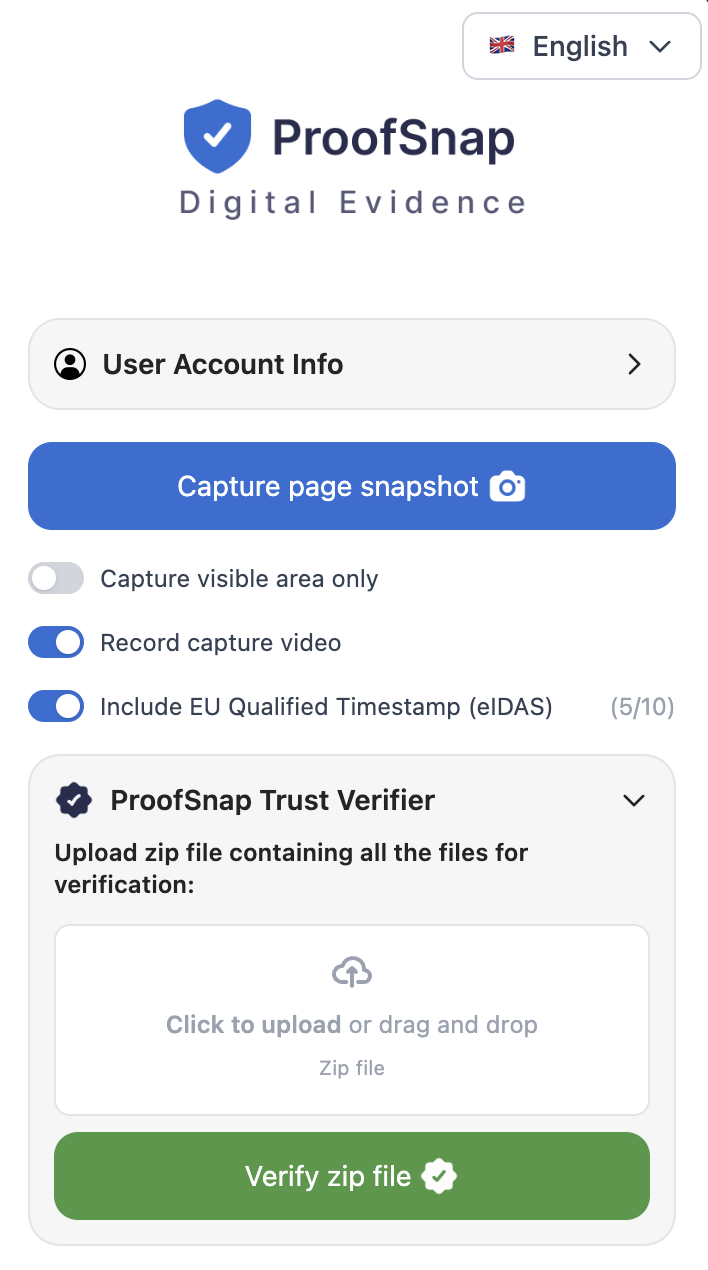
This is what ProofSnap looks like
The .ots files this page shows you how to verify are produced by a Chrome side panel. One button captures the page; the timestamp, the hashes and the chain of custody are then built around it automatically. Other extensions that anchor captures with OpenTimestamps are listed in our comparison of Chrome extensions with hash and timestamp.
-
Capture page snapshot
One click captures the full page (screenshot, HTML, DOM text, DNS, WHOIS, TLS and the HTTP response headers), then hashes every file and signs the manifest.
-
Include EU qualified timestamp (eIDAS)
The toggle adds a qualified timestamp from Disig a.s. on top of the Bitcoin anchor, with the remaining credits shown next to it.
-
Evidence language
The evidence PDF can be exported in a different language than the interface, so a filing goes out in the language of the court.
-
Trust Verifier and File Certifier
The same verification described above is built into the panel, and the File Certifier seals files you already have without capturing a page at all.
Each capture also produces a Provenance Certificate that records six integrity checks: automation detection, NTP time, DNS, device integrity, the Bitcoin anchor and the eIDAS timestamp. Images on the page are checked for C2PA Content Credentials, EXIF data and a perceptual hash, so an image that was generated or edited before it reached the page is flagged rather than quietly certified.
Screenshot of the current version. Whitelabel branding, shown at the top, puts a law firm's logo and colors on the evidence PDF and is available on Enterprise and Company plans. Files you already hold, rather than a live page, go through the self-serve File Certification instead.
Create blockchain-timestamped evidence in one click
ProofSnap captures any web page with a SHA-256 hash of every file, an RSA-signed manifest, a Bitcoin OpenTimestamps anchor and a chain of custody in line with ISO/IEC 27037. Every package carries the .ots file that anyone, including the other side, can verify with the steps on this page.
Plans from $8.99 per month. The 7-day trial requires a credit card; the one-time SnapPack at $4.99 is the alternative without a subscription. All evidence stays on your computer.
See exactly what a court receives
Download a real evidence package, the same ZIP that gets filed as proof, and run it through the Trust Verifier yourself. Or send any URL to support@getproofsnap.com and we will capture it for you, free.
Download the sample packageFrequently asked questions
The questions people actually ask when an .ots file lands in their inbox.
Sources and references
- OpenTimestamps, official website
- DGI, OpenTimestamps guide and stamping facility
- DGI, OpenTimestamps tutorial
- GitHub, opentimestamps-client (Python CLI)
- GitHub, fiatjaf/ots (Go CLI alternative)
- Wikipedia, OpenTimestamps
- Peter Todd, OpenTimestamps announcement (2016)
- European Commission, eIDAS 2 Regulation
- Cornell LII, Federal Rules of Evidence 902
- ProofSnap Trust Verifier, free evidence verification
- Frontiers in Blockchain, blockchain in the courtroom (2024)
- Purdue Global Law School, admissibility of blockchain evidence
- Fordham Law Review, blockchain evidence at trial (2024)
- Wikipedia, trusted timestamping
- GitHub, python-opentimestamps (reference implementation of the .ots format)
- Peter Todd, carbon dating the Internet Archive (2017)
Related articles
Are screenshots admissible in court? (2026)
eIDAS 2, FRE 901 and 902(14), Daubert, blockchain timestamps TechnologyBlockchain timestamping explained
How Bitcoin timestamps work for digital evidence TechnologyRSA-4096 and SHA-256 signatures explained
What manifest.sig proves and how to verify it with OpenSSL OSINTOSINT 101: preserve social media evidence
X, LinkedIn and Telegram, captured before deletion Evidence guideCyberbullying evidence: how to document it for police and court
WhatsApp, Instagram and Discord, step by stepDisclaimer: this article is for information only. OpenTimestamps is an open-source protocol maintained by its community, and ProofSnap is not affiliated with the project. The legal weight of blockchain timestamps varies by jurisdiction, so consult a licensed attorney about your own situation.