For SEC-registered investment advisers
SEC Rule 204-2 website archiving for investment advisers
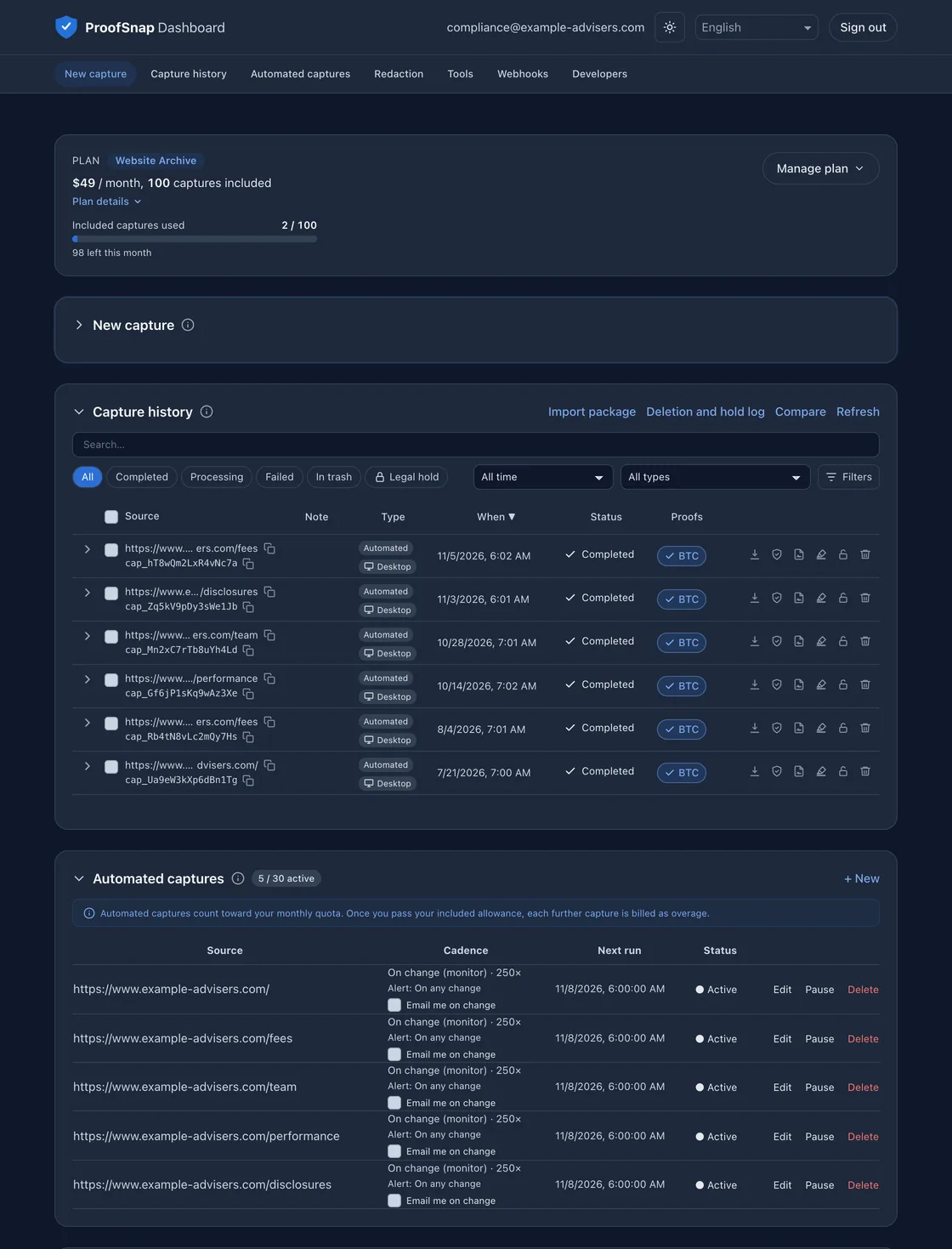
As of 2026, SEC Rule 204-2 under the Advisers Act requires an SEC-registered adviser to keep a copy of each advertisement for at least five years, and a web page offering its services generally counts. ProofSnap Website Archive checks up to 30 public pages daily and keeps a sealed copy of each detected version.
Sandbox: 50 watermarked test captures, no card.
By Radim Motycka, Founder and Lead Engineer at ProofSnap, who built this dashboard ·
What Rule 204-2 requires advisers to keep for their website
The SEC books and records rule requires a copy of each advertisement an adviser disseminates, and it sets how electronic records must be kept.
| The rule requires you to | Website Archive gives you |
|---|---|
| Keep a copy of each advertisement(a)(11)(i) | A sealed package of each version the daily check detects, plus any capture you start yourself after publishing. |
| Keep it five years, the first two in an appropriate office(e)(3)(i) | On an active plan, 10 years from the last day the page had that text, or from its date for a capture you start yourself. Open or download every copy from your office. |
| Index the records and produce them on request(g)(2)(i) and (ii) | Filter by page, domain, and period. Hand over the sealed ZIP and print its evidence PDF. |
| Store a duplicate, safeguard the records, and limit access(g)(2)(iii) and (g)(3) | A second copy in another EU region, tamper-evident packages, account sign-in, and read-only API keys. |
See the website paragraphs one by one
| The rule requires you to | Website Archive gives you |
|---|---|
| Keep a copy of each advertisement, and of other communications to ten or more persons(a)(11)(i)(A) and (B) | A sealed package of each version the daily check detects: screenshot, HTML, page text, and PDF. |
| Keep them five years, the first two in an appropriate office(e)(3)(i) | While your plan is active, 10 years from the last day the page still had that text, or from its date for a capture you start yourself. Every copy opens in the dashboard and can be downloaded. |
| Arrange and index the records for easy retrieval(g)(2)(i) | Capture history filters by page, domain, and period. API keys on the plan give read-only access to the same records. |
| Promptly provide the Commission a legible, true, and complete copy, a printout, and means to access, view, and print(g)(2)(ii) | You can provide the sealed ZIP as stored and print its evidence.pdf, and the dashboard lets you access and view the records. |
| Separately store a duplicate(g)(2)(iii) | Every copy is stored twice, in two EU regions, for as long as the original. |
| Maintain procedures to reasonably safeguard the records from loss, alteration, or destruction(g)(3)(i) | A changed file fails verification, and each package can be checked without ProofSnap. A legal hold you place blocks deletion while your plan is active. |
| Limit access to properly authorized personnel and the Commission(g)(3)(ii) | Account sign-in, read-only API keys on this plan, and a log of when each capture was deleted, restored, or placed on hold. |
Email, text messages, records supporting performance figures, and your written procedures stay with you. The books and records remain your responsibility.
When the five years start
"[...] for a period of not less than five years, the first two years in an appropriate office of the investment adviser, from the end of the fiscal year during which the investment adviser last published or otherwise disseminated, directly or indirectly, the notice, circular, advertisement [...]"
Paragraph (e)(3)(i) of 17 CFR 275.204-2, Code of Federal Regulations, 2025 edition.
For a fees page last displayed on March 2, 2026, at an adviser whose fiscal year ends on December 31:
In an appropriate office, through
December 31, 2028
Rule minimum, through
December 31, 2031
On an active plan, kept until
March 2, 2036
How Website Archive works
- 1List your pages. Up to 30 public URLs, such as home, services, fees, team, and disclosures.
- 2Daily check. ProofSnap compares each page's text with the previous check. Checks are not billed.
- 3New version, new copy. The first check that finds readable text seals a copy, and so does each detected change.
A 70-second demo with a sample account.
Each package holds the screenshot, the page HTML and text, and an evidence PDF, sealed with file hashes, a signed manifest, and an independent time proof (OpenTimestamps, the BTC label in Capture history). See every screen in the step-by-step Website Archive guide.
Website Archive pricing
$49 a month
or $490 a year, two months free
- Up to 30 pages checked daily
- 100 captures a month included, then $0.60 per capture
- Copies kept 10 years on an active plan, stored twice
Test first: 50 watermarked sandbox captures, no card.
Typical use. Thirty pages with a fresh copy every 90 days use about 10 captures a month, plus one for each page whose text changes.
If you cancel. The 10 years run while a plan is active. After you cancel, captures are kept for 30 days and then deleted, unless you download them first or move to the Archive only plan at $9 a month, which keeps every package readable and verifiable.
Who is behind ProofSnap
ProofSnap is operated by Software Innovations Group LLC, United Arab Emirates, founded in 2026 by Radim Motycka, who is based in Dubai. Registration details are in the Legal Notice, and the Terms of Service are governed by UAE law.
Packages are encrypted and stored in Frankfurt, with a second copy in Ireland; see Security and data handling. Each package carries its own verification scripts, so copies you download can be checked without ProofSnap. Send vendor due diligence questionnaires to support@getproofsnap.com.
Common questions from compliance officers
Start with your fees page
Open the ProofSnap Dashboard