Best evidence screenshot Chrome extensions, compared on hash and timestamp
The short answer
In October 2026, we compared fourteen evidence screenshot Chrome extensions. Thirteen hash the capture with SHA-256; the difference is the clock. WebNotary and Witness use RFC 3161 tokens from FreeTSA and DigiCert, BitProof anchors to Bitcoin, Atomshot and Stash use their developers' own time servers, and ProofSnap adds an eIDAS qualified timestamp from Disig a.s.
By Radim Motycka, founder of ProofSnap, who builds its evidence package and verification tools
·Published and verified 23 October 2026·Published by ProofSnap, one of the fourteen
What a hash and a timestamp prove
A SHA-256 hash is a 64-character fingerprint of a file. Change one byte and the fingerprint changes, so a matching hash shows the file is the same one that was hashed. On its own it says nothing about when that happened. A timestamp binds the hash to a moment in time. Together they show that this exact file existed at that time and has not changed since. Neither one says who wrote the page or whether what it says is true; that is a question for the content itself.
What separates the extensions below is who stands behind the clock. There are four kinds of timestamp in this category.
1. Device or vendor clock
The time the computer reports, or the time a vendor's own server reports. Quick and free, but the clock belongs to one of the parties: the person making the capture controls the device clock, and a vendor clock depends on trusting that vendor.
2. RFC 3161 time stamping authority
A separate authority, such as FreeTSA or DigiCert, signs a token over the hash and the time. Anyone can check the token later with openssl ts and the authority's certificate. The time comes from a third party.
3. OpenTimestamps on Bitcoin
The hash is aggregated into a Bitcoin transaction. The proof shows the data existed no later than that block. Nobody has to trust a company, but confirmation takes hours, so it fixes an upper bound rather than the minute of capture. How to check one: verify an OpenTimestamps .ots file.
4. eIDAS qualified timestamp
A timestamp from a qualified time stamping service listed on the EU Trusted List. Under Article 41(2) of the eIDAS Regulation, a qualified electronic time stamp enjoys the presumption of the accuracy of the date and time it indicates and of the integrity of the data it is bound to.
The fourteen extensions side by side
Facts as each Chrome Web Store listing or the vendor's own documentation states them, verified October 2026. "Not stated" means we could not find it in a public source, not that the feature is missing. Each name links to its listing, and Witness to its repository.
Signed ZIP of 11 to 15 files: full-page screenshot, page HTML, evidence PDF, metadata, chain of custody; video, chats, multi-tab sessions; WARC and HAR in forensic mode
SHA-256 manifest signed with RSA-4096
NTP-checked capture time; OpenTimestamps on Professional and above; eIDAS qualified from Disig a.s. on Enterprise and Company, or with the eIDAS SnapPack
verify.sh and verify.ps1 in every package, Trust Verifier, MIT-licensed command-line tool
$8.99, $16.99, $28.99 a month; SnapPack $4.99
483 users, 22 Oct 2026
Counted from this table: six of the fourteen take the time from a third party (an RFC 3161 authority, the Bitcoin blockchain or, for ProofSnap, NTP servers plus a Bitcoin or qualified stamp depending on the plan; Evidence Collector only on request), two use the developer's own time server, and six do not name a time authority.
Listings and vendor pages read on 23 October 2026. User counts are the figures the Chrome Web Store displays. Trademarks belong to their owners.
Each extension in brief
Grouped by the clock behind the timestamp, with the source for each profile.
RFC 3161 time stamping authority4
WebNotary: Evidence-Grade Web Capture
Saves one ZIP per capture with an MHTML archive, a full-page screenshot rendered in one pass through the Chrome debugger, a chain-of-custody PDF with the operator's name and an evidence manifest of SHA-256 digests. Timestamps come from FreeTSA and DigiCert by default, and the TSA list can point to Sectigo, Certum or an eIDAS qualified authority of your choosing. The bundle ships the sha256sum and openssl ts commands to check it. Version 0.1.0, with the code on GitHub.
An open-source extension from HappyHackingSpace, under the MIT licence. It saves MHTML, a viewport or full-page screenshot and metadata, links each capture to the previous one in a SHA-256 hash chain, and requests RFC 3161 tokens from FreeTSA and DigiCert while sending only the hash. Exports cover a ZIP with SHA256SUMS, WARC 1.1 and an HTML report. It is not on the Chrome Web Store: you build it and load it unpacked.
Built by ANALYTIX LABS LTD for OSINT casework. It captures stitched screenshots, recordings with audio, a DOM snapshot, MHTML, the raw HTTP response, PDF and DOCX reports and BagIt bundles. Files are hashed into a Merkle manifest sealed with an Ed25519 key per install, timestamped through an RFC 3161 authority you supply and corroborated with OpenTimestamps. It keeps an append-only audit log and a chain-of-custody view per case. Free, with a UserSearch account.
An extension in Portuguese and English. It captures visible-area, selected-area and full-page PDFs, records WebM video, exports MHTML and HTTP data, and writes a -hash.txt file with SHA-256 and an HMAC-SHA256 tag for every file. From that hash file you can request a FreeTSA RFC 3161 token and an OpenTimestamps proof. A consolidated PDF report lists the session. Also on Firefox.
Packs a screenshot, the HTML source, a PDF, a JSON manifest and an OpenTimestamps proof into a .bitproof bundle, and offers an optional authorship signature. A Deep Archive mode captures a public URL on BitProof's server. Bundles are checked in the BitProof verifier or with the standard ots client.
The extension of an established litigation capture service. It sends the URL to Page Vault, which captures the page in its own remote browser, hashes it with SHA-256, and records the time and the capturing account. Affidavit cover pages can be added on request. Included for Page Vault customers; the Browser plans are quoted on request and On Demand collections start at $199.
Pagefreezer's extension for law firms and investigators. It collects pages, social media, video and whole sites and exports PDF, MHTML and WARC with a collection report. Pagefreezer describes SHA-256 hashes, digital signatures and time from a Stratum-1 clock. A paid subscription is required and the price is not published.
Takes full-page PNG screenshots and embeds the proof in the image: SHA-256 of the pixels and of the DOM, an ECDSA P-256 signature from a key generated at install, and a signed timestamp from the Stash attestation server. The DOM is hashed, not stored.
Organises PNG captures, MHTML snapshots, selected text, images, links and notes into cases, each file with a SHA-256 hash and each log entry chained to the one before. Each record carries the time in the local time zone and in UTC. A case exports as a ZIP with a report, the original files and a hash manifest. Version 3.0.0 made every feature free, with no account required.
Saves the full page as a single self-contained archive to Downloads with a SHA-256 fingerprint and the time of capture, and keeps a local log of URL, title, time, hash, size and case name. It offers a 7-day trial, then costs $2.99 a month or $29.90 a year.
One click turns the visible part of the page into a single-page PDF with the URL, the title, the capture time in UTC and a SHA-256 hash of the embedded JPEG. Everything runs locally.
A screenshot and annotation tool for legal work from AIBridges. It captures the visible area, a region or the full page, adds exhibit labels, Bates numbers and confidentiality stamps, runs OCR on the device, and records SHA-256 hashes. Batch mode captures up to 20 URLs with a consolidated timestamp report. The Pro plan adds an AES-256-GCM encrypted vault; the Firm plan adds chain-of-custody logging and WORM storage with S3 Object Lock. It exports to PNG, PDF, Word and encrypted .ssp archives.
Built by the Mainz law firm gulden röttger rechtsanwälte for its own copyright cases. It takes a screenshot and writes the exact URL, date and time into the image. The time comes from the firm's own time server (EMC Professional 3011), which receives atomic time by radio from the Physikalisch-Technische Bundesanstalt (PTB). The listing names Chrome, Brave, Microsoft Edge and Vivaldi.
A forensic web capture platform that runs as a side panel in Chrome and Microsoft Edge. Each capture becomes a signed ZIP of 11 to 15 files depending on the plan (Essential 11, Professional 12, Enterprise and Company 15).
Integrity: every file is listed with its SHA-256 hash in manifest.json, which is signed with RSA-4096. A hash-chained forensic log and a chain_of_custody.json modelled on ISO/IEC 27037 record each step, including the layout changes made for the capture.
Time: the capture time is checked against NTP servers. On Professional and above, the manifest is anchored to Bitcoin through OpenTimestamps. Enterprise (10 stamps a month), Company and the eIDAS SnapPack add an eIDAS qualified timestamp from Disig a.s., a Qualified Trust Service Provider on the EU Trusted List.
Context: DNS checked against two resolvers, WHOIS, HTTP headers, C2PA Content Credentials on the screenshot, and, in forensic mode (Professional and above), WARC, HAR, every loaded resource and the site's TLS certificate details.
Beyond one page: video recording, multi-tab sessions, WhatsApp Web, Telegram, Discord, Slack, Messenger and LinkedIn capture, file certification and a REST API.
Verification: verify.sh and verify.ps1 inside every package, the Trust Verifier in the browser, and the MIT-licensed proofsnap-verify command-line tool (npx proofsnap-verify package.zip).
Essential $8.99, Professional $16.99 and Enterprise $28.99 a month. A SnapPack gives 10 captures for $4.99 with no subscription, and the eIDAS SnapPack starts at $6.99. The 7-day trial requires a credit card.
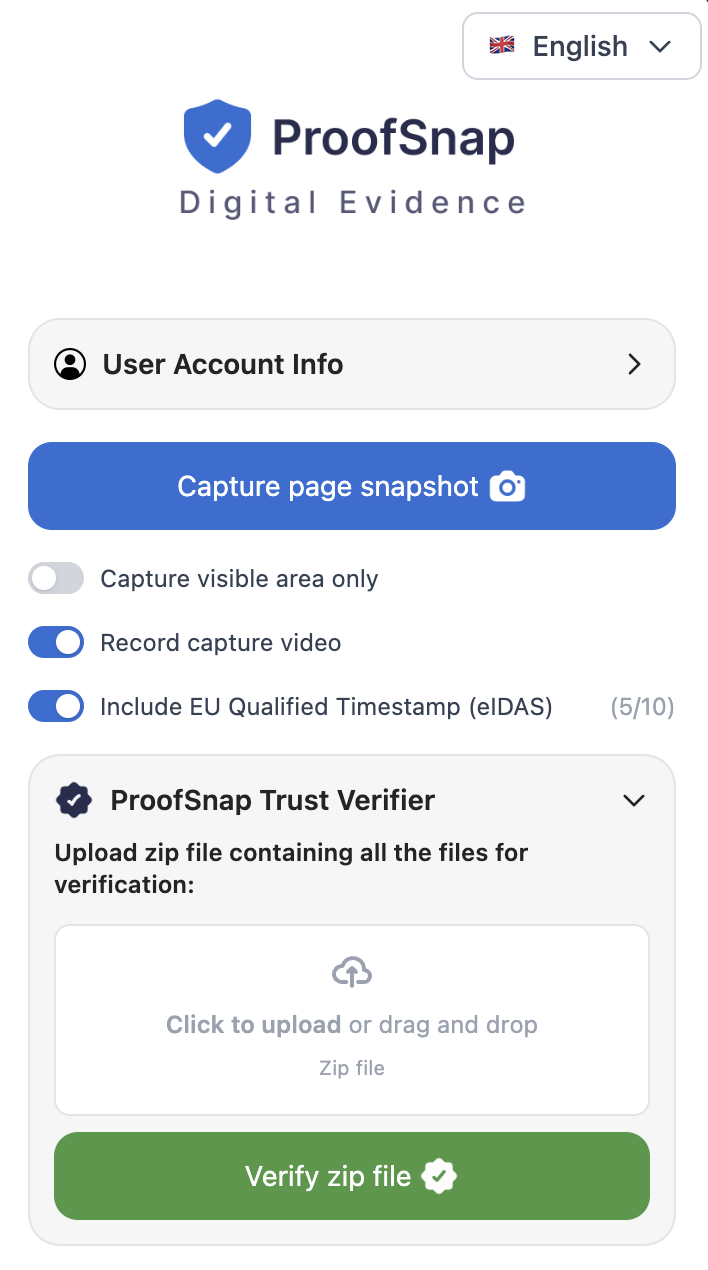
The ProofSnap side panel: the "Capture page snapshot" button, the choice of evidence language, and the switches for video and the eIDAS qualified timestamp.
How to choose
1. Decide who has to trust the clock. If the capture only supports your own notes, a device clock is enough. If the other side will challenge it, pick a timestamp from a third party: an RFC 3161 authority, a Bitcoin anchor, or, for EU proceedings, an eIDAS qualified timestamp.
2. Check what is hashed. A hash over one image proves less than a signed manifest over the screenshot, the page source and the metadata together. Look for a manifest that lists every file.
3. Ask how an outsider verifies it. The best answer is a standard tool (openssl ts, ots, sha256sum) or an open-source verifier that the reader can run without an account with the vendor.
4. Match the format to the page. MHTML and WARC keep the page structure; a full-page screenshot shows what a person saw; video shows how the page was reached. Social feeds and chats load as you scroll, so check that the tool handles them.
5. Look at the listing itself. The number of users, the date of the last update and a named developer tell you whether the tool will still be maintained when your case reaches a hearing.
ProofSnap is our product. These are the situations it was built for.
Evidence for proceedings in the EUAn eIDAS qualified timestamp from Disig a.s., a Qualified Trust Service Provider on the EU Trusted List: 10 stamps a month on Enterprise, 5 a month per member on Company, or with the eIDAS SnapPack.
The other side can check it independentlyThe MIT-licensed proofsnap-verify tool and the Trust Verifier in the browser check the hashes, the signature and the timestamps; the scripts inside every package check the hashes, the signature and the eIDAS timestamp. None of them needs a ProofSnap account.
Chats, social networks and videoDedicated capture for WhatsApp Web, Telegram, Discord, Slack, Messenger and LinkedIn, multi-tab sessions with a snapshot of each tab, and video recording of the capture.
Automated capturesA REST API with a dashboard for teams that capture at scale; captures run on ProofSnap servers.
Which evidence screenshot Chrome extension captures a website with a hash and a timestamp?
Thirteen of the fourteen extensions in this comparison record a SHA-256 hash of what they capture; Atomshot instead writes the URL and the time into the screenshot itself. They differ in the clock behind the timestamp. WebNotary and Witness request RFC 3161 tokens from FreeTSA and DigiCert, BitProof anchors to Bitcoin through OpenTimestamps, Stash uses its own attestation server, and ProofSnap adds an eIDAS qualified timestamp from Disig a.s. on Enterprise and Company, or with the eIDAS SnapPack.
What is the difference between a device clock timestamp and an RFC 3161 timestamp?
A device clock timestamp is whatever time the computer reports, and the person who captured the page controls that clock. An RFC 3161 timestamp is a token signed by a separate time stamping authority over the hash, so the time comes from a third party and anyone can check the signature later with standard tools such as openssl ts.
Does an OpenTimestamps Bitcoin proof show the exact time of capture?
No. An OpenTimestamps proof shows that the hashed data existed no later than the Bitcoin block it was anchored in. Confirmation takes hours, so it is a strong upper bound on the time, not the minute of capture. That is why tools pair it with a capture time from NTP or an RFC 3161 authority.
Which extensions offer an eIDAS qualified timestamp?
Among the fourteen, ProofSnap is the one with a named qualified provider built in: Disig a.s., a Qualified Trust Service Provider on the EU Trusted List, on the Enterprise and Company plans and with the eIDAS SnapPack. WebNotary lets you configure your own eIDAS qualified authority. The other listings do not name a qualified provider.
Are there free Chrome extensions for web evidence with a timestamp?
Yes. WebInvestigator states that every feature is free with no account, Forensic Web Capture by UserSearch is free and needs a UserSearch account, and Witness is open source under the MIT licence and installed from source. Evidence Collector has a free tier and a Pro tier, and SwiftShot has a free plan of three captures a day.
Does the extension capture the page on my computer or on a server?
Most capture the page in your own browser. WebNotary, WebInvestigator, SwiftShot and Web Evidence Capture for Court state that the capture runs locally. Page Vault sends the URL to its own remote browser, and BitProof's Deep Archive mode captures a public URL on BitProof's server. ProofSnap captures the page as it appears in your own browser session, including pages behind your login.
Which of these extensions also work in Edge or Firefox?
ProofSnap is listed on both the Chrome Web Store and Microsoft Edge Add-ons. Forensic Web Capture by UserSearch names Chrome, Edge, Brave, Opera and Vivaldi; Page Vault's knowledge base says its extension supports Edge; Atomshot names Chrome, Brave, Edge and Vivaldi. Evidence Collector and BitProof also have Firefox versions. For the others we found no Edge or Firefox version.
How do I take a timestamped screenshot of a website for court?
Use an extension that captures the full page, hashes every file and gets the time from a third party, not from your own computer. Capture the page as it loads in your browser, keep the downloaded package exactly as it was produced, and hand it over whole, with the files that explain how to check the hashes and the timestamp.
How does the other side check a capture without trusting the tool?
It recomputes the hashes and checks the timestamp against the issuer. With an RFC 3161 token, that means openssl ts and the authority's certificate; with OpenTimestamps, the ots client or a public verifier. A ProofSnap package carries verify.sh and verify.ps1, and the MIT-licensed proofsnap-verify command-line tool runs the same checks.
Method
We started from the extensions that AI assistants and search results name for the query "Chrome extension to capture a website with hash and timestamp", then read each Chrome Web Store listing, and the vendor's own site or repository where one exists, on 23 October 2026. Only facts stated in those sources are in the table. "Not stated" means the source does not say, not that the feature is absent. Extensions whose stated verification site did not load on the day of review are left out.
This page is published by ProofSnap, which is one of the fourteen. ProofSnap facts come from the product itself and its published price list. We make no claim about the admissibility of any tool's output. If a listing has changed, write to support@getproofsnap.com and we will update the table.
Verified: 23 October 2026.
Seal a page with a timestamp the other side can check
Install ProofSnap in Chrome or Edge, capture the page, and hand over one ZIP with its own verification scripts.