Preservation guide · investigators, litigators, compliance
How to preserve social media evidence so it still works a year later.
Seven steps, in the order they have to happen. The first one is not technical and most people get it wrong: decide whether a preservation duty has already attached, because from that moment deletion is somebody's spoliation problem and the clock is running.
Then capture the same day, in a form that carries source, time and integrity rather than pixels, and seal it so any later change is detectable by someone who does not trust you.
Written by the team that builds a capture tool. The bias that implies is stated openly, and the steps that need no tool at all are marked as such.
Preservation precedes analysis. Capture first, read later. The instinct to understand the content before saving it is the most common way good evidence is lost, because the account holder is deleting on their schedule, not yours.
The window you are working in
Typical sequence once content becomes relevant
Content is posted
Public, indexed, quoted, screenshotted by strangers
You find it
This is the whole window. It may be hours.
Capture and seal
About 41 seconds. Everything after this point is recoverable.
Someone tells them
A friend, a lawyer, a demand letter, an instinct
It is gone
Deletion is instantaneous and irreversible from the outside. What you have now is what you captured at step 3.
If step 5 arrives before step 3, everything after it is legal process, third-party copies and argument. None of which is as good as having captured it.
The gap between finding and sealing is the only part of this you control.
Every package can be verified by anyone, for free, in the open Trust Verifier.
Quick answer
How do you preserve social media evidence for court?
Capture the publicly visible page the day you find it and seal it so any later change is detectable. First check whether a preservation duty has attached, because deletion after that point is sanctionable under FRCP 37(e). A ProofSnap capture records the URL, response headers, TLS certificate and an NTP-verified time, then hashes and anchors the result. Seven steps below.
Three of the seven steps need no tool at all and are marked as such. This is a practitioner's workflow, not legal advice, and the preservation duty analysis in particular is jurisdiction-specific and consequential enough to be worth real advice.
Scope. This page is the legal workflow: when the duty attaches, what a defensible capture has to record, how to seal it, and what remains when the content is gone. For the platform-by-platform mechanics of finding and pulling the content itself on X, LinkedIn, Telegram and the rest, see OSINT 101: preserve social media evidence before it is deleted, which goes far deeper on technique.
Step zero: has a duty to preserve already attached?
Almost every guide on this subject starts with tooling. That is the wrong first question, because the legal consequences of getting this part wrong dwarf anything a capture tool affects. In United States federal practice a duty to preserve relevant electronically stored information attaches once litigation is reasonably anticipated, which is frequently long before a complaint exists. A demand letter, a serious internal complaint, an incident that obviously leads somewhere, all of these can start the clock.
“The best evidence rule in respect of an electronic document is satisfied on proof of the integrity of the electronic documents system by or in which the electronic document was recorded or stored.”
From that moment, deletion is not housekeeping. Federal Rule of Civil Procedure 37(e) allows measures no greater than necessary to cure the prejudice when ESI that should have been preserved is lost and cannot be restored or replaced, and on a finding that a party acted with intent to deprive another of the information, it permits an adverse inference instruction or dismissal.
What it cost in Lester
In Allied Concrete Co. v. Lester, 285 Va. 295, 736 S.E.2d 699 (2013), counsel's office instructed a wrongful death plaintiff to clean up his Facebook account and the account's state was then misrepresented in discovery. Sanctions totaled roughly $722,000 against the plaintiff and his attorney, with the larger share falling on the attorney. The Supreme Court of Virginia upheld the sanctions.
What it cost in Edwards
In Edwards v. Junior State of America Foundation, No. 4:19-cv-140-SDJ (E.D. Tex. Apr. 23, 2021), the native Facebook messages were lost after a preservation duty had attached, and screenshots could not adequately replace them. The court applied Rule 37(e) and precluded the plaintiffs from offering evidence about the messages at all. The screenshots were the plaintiffs' own evidence, and they were left with nothing.
Practical consequence, both directions
If you represent or advise the account holder, issue a written litigation hold, tell them in writing not to delete or deactivate anything, and document that you did. Deactivation is not deletion on most platforms but it is not preservation either, and it looks like concealment. If you are on the other side, send a preservation letter early: it converts later deletion from your evidence problem into their sanctions problem, and it costs one letter.
In the order they have to happen
The seven steps.
-
1
Identify the accounts and issue the hold (no tool required)
List the accounts, the custodians and the platforms before touching anything. Where you act for the holder, issue the litigation hold in writing. Where you do not, send a preservation letter. This step takes an hour and is the only one with six-figure consequences.
-
2
Do nothing that alerts the account holder (no tool required)
No connection requests, no follows, no likes, no messages, no viewing stories on platforms that show the viewer list. Beyond the obvious risk of triggering deletion, interaction under a false identity creates exposure under the Stored Communications Act, state impersonation statutes, professional conduct rules and platform terms, and taints everything collected in the matter.
-
3
Capture before you analyze
Resist the urge to read everything first and capture the good bits afterward. Capture the profile, then the posts, then the surrounding context, then read. Deletion is instantaneous and irreversible from the outside, and no part of this workflow improves by waiting.
-
4
Capture more than pixels
The full page rather than a crop, the page HTML as served, the DOM text, the HTTP response headers, the DNS resolution cross-checked against independent resolvers, the TLS certificate, and a capture time verified against NTP rather than the workstation clock. These are the distinctive characteristics Rule 901(b)(4) contemplates, and they are impossible to reconstruct afterward.
-
5
Seal it cryptographically
Hash every file with SHA-256. Sign the manifest listing those hashes and export the public key with it. Then anchor the manifest hash somewhere outside your own control, because a hash you keep on your own laptop proves only that you have not changed the file since you decided to record the hash. Bitcoin OpenTimestamps does this publicly and free; an eIDAS qualified timestamp does it with statutory weight in the EU.
-
6
Record the chain of custody as you go
Who collected it, when, from which device, browser and version, by what method, and every transfer since. ISO/IEC 27037:2012 is the standard to model on for the acquisition itself, and the ISO 21043 forensic sciences series for the process around it, whose Clause 8 asks for records sufficient for another trained examiner to report from. The test is whether an independent reader could reconstruct what you did without asking you. A log written at the time, with entries linked in a hash chain, is a different artifact from one assembled from memory a year later.
-
7
Escalate to process for what you cannot reach (no tool required)
Restricted content, deleted content and subscriber information come through subpoena, court order or the platform's legal process. Note that the Stored Communications Act generally prevents providers from disclosing communication contents to private parties even under a civil subpoena, so non-content records are usually the realistic target and the content itself typically has to come from a party. Your capture preserves the visible surface while that runs.
What breaks where
Platform specifics worth knowing before you capture.
Facebook and Instagram
Comments load lazily and collapse behind more links, so a naive capture records a fraction of the thread. Expand everything before capturing. Post permalinks are stable and worth recording separately from the feed URL. Stories expire on their own schedule regardless of anyone's intentions, so they are the highest-urgency content on any file. Viewing a story is visible to the poster on Instagram, which matters for step 2.
X, formerly Twitter
Threads fragment across replies and quote posts, and the surrounding conversation is often more probative than the single post. Capture the permalink view rather than the timeline view. Deleted posts frequently survive in quote posts and replies by others, which is one of the more reliable recovery routes on any platform.
TikTok and YouTube
The evidentiary content is often the video itself rather than the page, and a page capture records the frame, the caption, the counts and the comments but not the moving image. Where the video matters, record it as well, which on ProofSnap means running the capture with recording enabled so the playback is inside the sealed package. Comment sections are frequently the richest part and are usually the first thing deleted.
Employment history, dates and job titles are the usual target, and they are edited quietly and often. LinkedIn also notifies people about profile views depending on settings, which is a step 2 problem. Note Linscheid v. Natus Medical Inc., 2015 WL 1470122 (N.D. Ga. Mar. 30, 2015): a printed LinkedIn profile with a declaration from the person who printed it was not authenticated. When the posts matter as much as the profile, a LinkedIn profile evidence capture seals the profile and its post history in one recorded session.
Messaging apps
Disappearing messages and delete for everyone make these the most volatile content in existence, and the account holder can remove their side from your device. Where you control one side of the conversation, use the platform's own export and preserve the raw export untouched alongside any rendered transcript. Web clients such as WhatsApp Web, Telegram Web, Discord and Slack can be captured directly through the browser session you are already entitled to use.
Anything behind a login you control
Carrier portals, claims systems, dashboards, admin panels, marketplace seller accounts. There is no legal problem in capturing a page you are personally entitled to view, and these often hold the most probative material on a matter. The capture records that the session was authenticated without recording credentials, and authentication and cookie headers are stripped from the stored HTTP record.
Three ways to get the content
Screenshot, platform export, forensic capture.
Most guides on this topic compare these three and stop before the price, because the tools they sell are quoted on a call. Here are the numbers.
| Screenshot | Platform export or subpoena | Forensic capture | |
|---|---|---|---|
| Source URL recorded | No, unless you photograph the address bar | Yes | Yes, as requested and as resolved |
| Independent capture time | No, only the file date the OS will change | Platform's own record | NTP verified, anchored in Bitcoin, optional eIDAS qualified timestamp |
| Integrity provable later | No | Depends on the custodian declaration | SHA-256 per file, RSA-4096 signed manifest |
| Works on someone else's account | Yes, public content | Only through legal process | Yes, public content |
| Time to obtain | Seconds | Days to months | About 41 seconds |
| Cost | Free, and it can cost you the exhibit | Counsel time, court fees | $4.99 for 10 captures, or $18.99 per seat per month |
| Verifiable by the other side | No | Through the producing party | Yes, offline, with python3, openssl and an ots client |
The three are not mutually exclusive. The strongest position is a forensic capture on the day of discovery, followed by legal process for the platform record if the matter goes the distance. The capture protects you against the content disappearing while the process runs.
You arrived too late
The content is already gone. Now what?
Four routes, roughly in order of how often they work. None of them is a capture tool, which is why this section exists on a capture tool's website.
1. Third-party copies
The most underused route and often the most productive. Quote posts, replies, reposts, screenshots other people published, forum discussions, news coverage, and aggregator sites. None of these are under the original poster's control, so deleting the original post does nothing to those copies. Search the distinctive phrasing rather than the account name. Capture whatever you find immediately, because it is now the only copy and it is on someone else's schedule.
2. Caches and archives
Search engine caches are short-lived but sometimes still there. The Internet Archive, archive.today and similar services occasionally hold the page. Treat these as leads and corroboration rather than as proof: Weinhoffer v. Davie Shoring, Inc., 23 F.4th 579 (5th Cir. 2022) held an Internet Archive capture was neither self-authenticating nor a proper subject of judicial notice, in part because the archive's own terms disclaim guarantees of accuracy. If you find the content in an archive, capture the archive page forensically, which at least fixes what the archive showed and when you saw it.
3. The account holder, through discovery
Where the holder is a party, request native production of the account data, including the platform's own download-your-data export. If the material was destroyed after a preservation duty attached, Rule 37(e) is the remedy, and Edwards shows how far it reaches. This route is slower but produces the strongest artifact, because a platform export comes from the source with identifiers and timestamps a rendered page hides.
4. The platform, through legal process
Manage expectations here. The Stored Communications Act generally prevents providers from disclosing the contents of communications to private parties even under a civil subpoena, so in civil matters the realistic target is subscriber and non-content records, obtained through the platform's law-enforcement or legal-process channel and subject to their retention periods, which are shorter than most people assume. Criminal process reaches further. Either way, send the preservation request first: platforms will typically preserve pending process, and that request costs nothing.
The honest summary: every one of these is more expensive, slower and weaker than having captured the page on the day you found it. That is not a sales argument; it is the arithmetic of the situation, and it is the reason the preservation step belongs at the front of the workflow rather than after the analysis.
Outside the United States
England and Wales, Canada, Australia, and the EU.
The workflow above is written against United States practice, because that is where the preservation duty analysis bites hardest. The steps do not change elsewhere, but the reason they work does, and it is worth knowing which provision you are relying on before someone asks.
England and Wales
Civil Evidence Act 1995 · CPR PD 57ADThe framing is different enough to catch out anyone reasoning from United States practice. Section 1(1) of the Civil Evidence Act 1995 abolished the rule against hearsay in civil proceedings, and section 8 allows a statement in a document to be proved by producing the document or a copy of it, no matter how many times removed, authenticated in whatever manner the court approves. So a screenshot is not fighting for admission the way it does in a United States court.
The fight moves to weight. Section 4 sets out what the court considers when deciding how much weight hearsay deserves, including whether it would have been reasonable to produce the maker of the statement, whether the original was contemporaneous, and whether any person involved had a motive to conceal or misrepresent. An unexplained screenshot is admitted and then given very little.
On the procedural side, a document means anything in which information of any description is recorded, which plainly reaches social media and electronic communications. Disclosure in the Business and Property Courts runs under Practice Direction 57AD, in force since 1 October 2022, with PD 31B governing electronic documents elsewhere, and metadata is disclosable alongside native documents. Producing a flattened image where a native document with metadata exists is therefore a disclosure question as much as an evidential one.
Canada
Canada Evidence Act ss. 31.1-31.5Canada legislated this directly, and the wording rewards a forensic method more explicitly than any other regime here. Section 31.1 puts the burden on the person seeking to admit an electronic document to prove its authenticity by evidence capable of supporting a finding that it is what it is purported to be, which reads very close to Federal Rule 901(a).
The interesting part is section 31.2. The best evidence rule for an electronic document is satisfied on proof of the integrity of the electronic documents system in which it was recorded or stored, rather than by producing an original. Section 31.2(2) adds that a printout satisfies the rule where it has been manifestly or consistently acted on, relied on or used as a record. Section 31.3 then presumes system integrity, absent evidence to the contrary, where the system was operating properly, or the document was recorded by the opposing party, or by a third party in the usual and ordinary course of business.
Section 31.5 is the provision to know: evidence may be led about any standard, procedure, usage or practice concerning how electronic documents are recorded or stored. That is an open invitation to put the collection method itself in evidence, which is exactly what a documented, hashed, logged capture is for. Provincial evidence statutes carry closely parallel provisions.
Australia
Evidence Act 1995 (Cth) and uniform state ActsThe uniform evidence legislation removed the problem at the root. Section 51 abolished the common law original document rule, and section 48 allows the contents of a document to be proved by tendering a copy, an extract or a summary, among other routes. The Act avoids the word original altogether, which sidesteps the argument about whether a capture is an original or a duplicate.
Two presumptions then do real work. Section 146 presumes that where a document or thing was produced by a device or process that, if properly used, ordinarily produces a particular outcome, it did produce that outcome on this occasion, unless evidence sufficient to raise doubt is adduced. That is directly on point for a capture tool: show what the process ordinarily does, and the presumption carries the rest.
The trap. Section 147, the business records version of the same presumption, expressly does not apply to a document produced for the purpose of, or in contemplation of or in connection with, a proceeding, or in connection with an investigation leading to a criminal proceeding. Evidence captured for the litigation is precisely the category it excludes. Practitioners who reach for section 147 because the phrase business records sounds right will be met with that carve-out. Section 146 is the provision that helps here, and the evidence about what the process ordinarily does has to be led.
One collection, four regimes. Whether the question is authentication under Rule 901, weight under section 4 of the Civil Evidence Act, system integrity under section 31.2 of the Canada Evidence Act, or the section 146 presumption in Australia, the answer is the same artifact: a record carrying its own source, time and integrity, with a written account of the method behind it. That is why step 6, the contemporaneous chain of custody log, matters as much as the capture itself. In Canada it is expressly admissible under section 31.5; in Australia it is how you establish what the process ordinarily does for section 146; in England and Wales it is what lifts the weight under section 4.
And in the EU, a stronger option than a hash
The EU adds the one mechanism that turns an evidentiary argument into a statutory presumption outright. Under Article 41(2) of the eIDAS Regulation, a qualified electronic time stamp enjoys a presumption of the accuracy of the date and time it indicates and of the integrity of the data it is linked to, in all 27 member states. That is not a point you have to persuade a court of. It is the starting position, and the burden sits on whoever wants to displace it.
Qualified timestamps
A qualified electronic time stamp has to come from a Qualified Trust Service Provider on the EU Trusted List, which is a supervised, audited status rather than a marketing claim. ProofSnap issues these through Disig a.s., a Qualified Trust Service Provider on the EU Trusted List, on the Enterprise and Company plans and through eIDAS SnapPack credits. The package carries the RFC 3161 token, the TSA certificate chain, the root CA, and OCSP and CRL data, so the timestamp can be validated offline years later without contacting anyone.
GDPR, which applies and does not prohibit
Collecting personal data for the establishment, exercise or defence of legal claims has a recognized basis under the GDPR, with Article 9(2)(f) providing the corresponding route for special category data. What the regulation demands is proportionality and discipline: collect what is relevant rather than everything about the person, keep it as long as the matter needs and no longer, secure it, and be able to explain the basis. A discrete hashed package per item is materially easier to defend on proportionality than a bulk archive of somebody's whole profile.
For a matter with any European leg, an eIDAS qualified timestamp alongside the Bitcoin anchor costs one extra step at capture time and changes the burden of proof on the date. It is the cheapest leverage available in this entire workflow. Take advice for your own jurisdiction. Nothing here is a substitute for it.
The tool itself
This is the whole interface.
Step four of the workflow above, in practice. A side panel in Chrome or Edge, one button, and the seven things a defensible capture has to record happen without the operator having to remember any of them.
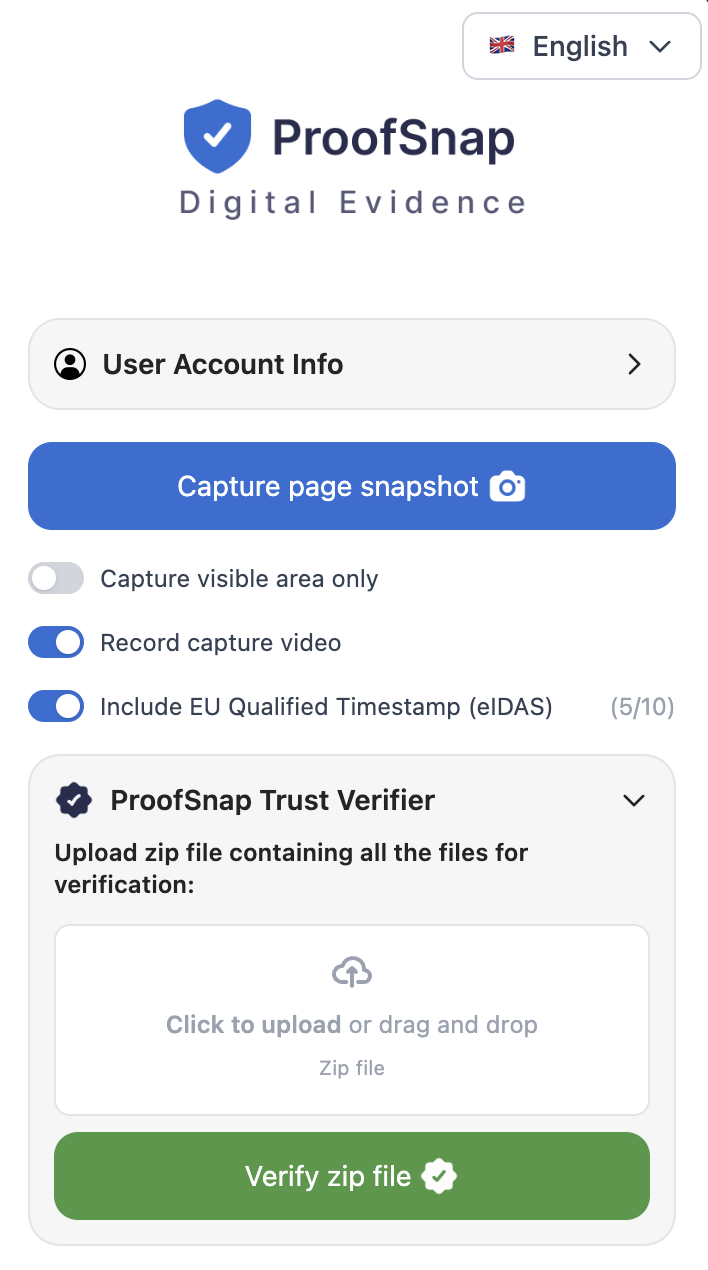
The side panel, actual size relative to a browser window.
Capture page snapshot
The one button that does the work. Scrolls and stitches the full page, saves the HTML as served and the DOM text, records the response headers, DNS, WHOIS and TLS, checks the clock against NTP, hashes everything and signs it. About 41 seconds.
Case and examiner details
Optional matter reference and examiner identity, written into the evidence PDF and the chain of custody so the package identifies the file it belongs to without a covering note.
Evidence language
The evidence PDF can be exported in a different language from the interface, which matters when the investigator and the tribunal do not share one. The structured JSON files stay in their standard form for verification tooling.
Whitelabel branding
A toggle, not a professional services engagement. Your logo, color, firm name, address and contact email replace the default header on the evidence PDF. Enterprise, and the administrator on the Company plan.
Record capture video
Records the capture as it happens and puts the recording inside the sealed package, which answers the question of what the operator did between opening the page and producing the file.
EU qualified timestamp
One toggle adds an eIDAS qualified RFC 3161 timestamp from Disig a.s., a Qualified Trust Service Provider on the EU Trusted List. The counter shows the remaining allowance on the plan.
Trust Verifier and File Certifier sit in the same panel. The verifier checks any ProofSnap package, including one somebody else produced, so the receiving side can validate without installing anything of their own. The certifier seals files you already hold, such as an export, a photograph or a PDF, rather than a web page. Nothing here needs configuration before the first capture.
Do not take our word for it
Download a real evidence package and break it yourself.
Every other vendor writing about this topic asks you to book a demo before you can see the deliverable. Here is the actual ZIP. Open it, read the manifest, recompute the hashes, check the signature against the public key, then change one byte in the screenshot and watch the verification fail. That takes about five minutes and tells you more than any demo call.
unzip proofsnap-sample-evidence-package.zip -d sample && cd sample
sha256sum -c <(python3 -c "import json;[print(v+'  '+k) for k,v in json.load(open('manifest.json'))['files'].items()]")
openssl dgst -sha256 -verify publickey.pem -signature manifest.sig manifest.json
bash verification/verify.shThe exact commands are in verification/VERIFICATION_GUIDE.txt inside the ZIP. Nothing in the verification path runs through ProofSnap.
Preservation questions in practice
FAQ
The gap between finding it and sealing it is the only part you control.
Install the extension and close that gap to about 41 seconds. Or download the sample package first, run the verification script, and satisfy yourself that the seal does what this page says before you sign up for anything.
Start the 7-day trialCredit card required. Cancel any time during the trial at zero cost. Or buy a $4.99 SnapPack for 10 captures with no subscription and no auto-renewal.
Disclaimer: This page provides general information about preserving publicly available social media content as evidence. It is not legal advice and does not create an attorney-client relationship. ProofSnap is not a law firm and does not act as an expert witness. The preservation duty analysis, the scope of the Stored Communications Act, professional conduct obligations and data protection requirements are jurisdiction-specific and consequential; take advice on your own matter. Statutory references for England and Wales, Canada and Australia are given for orientation only; Scotland and Northern Ireland differ, Canadian provincial statutes differ in detail from the federal Act, and the Australian uniform legislation is adopted with variations by state. Case summaries are provided for orientation and should be read in full before being relied on. Rules and their interpretation change over time.
Related ProofSnap pages
- Social media evidence case law 14 decisions with full citations
- Are screenshots admissible in court? the rules and the four hurdles
- Evidence for investigators and OSINT
- OSINT 101: preserve social media evidence platform-by-platform technique
- Evidence for law firms self-authentication under FRE 902(14)
- Social media evidence for insurance SIU
- Workers comp social media evidence
- eIDAS qualified timestamps Article 41(2) in all 27 member states
- Trust Verifier check any package in the browser
External references
- FRCP 37(e), failure to preserve ESI
- FRE 901, authenticating or identifying evidence
- FRE 902, evidence that is self-authenticating
- ISO/IEC 27037:2012, digital evidence handling
- eIDAS Regulation (EU) No 910/2014
- 18 U.S.C. 2702, Stored Communications Act disclosure
- GDPR Article 9(2)(f), legal claims
- Civil Evidence Act 1995 (England and Wales)
- Canada Evidence Act, s. 31.2
- Evidence Act 1995 (Cth), Australia