For workers comp SIU, adjusters, TPAs and defense counsel
The post contradicts the restriction. Now make it hold up.
Finding the content is the easy part. The part that decides the file is whether the exhibit still stands after claimant's counsel has spent twenty minutes on it. A screenshot rests entirely on the investigator's word. A sealed capture carries its own proof of source, time and integrity.
Every guide on this topic is written for the claimant. Search the phrase yourself and you will find page after page of advice on how to avoid being caught. This one is written for the desk on the other side of the file.
Capture takes about 41 seconds and produces a package the adjuster, the commission or opposing counsel can verify offline, without you and without us.
Prefer to inspect the deliverable first? Download a sample package and run the verification script before you sign up.
Public surface only. No friend requests, no pretext accounts, nothing behind a privacy setting. A better capture tool does not widen what an investigator may lawfully collect, and pretending otherwise is how a whole file gets discounted.
$18.99 per seat per month · minimum two seats, no upper limit · no sales call
Work restrictions
Treating physician, 6 weeks ago
01No lifting over 10 lb
02No overhead reaching, right shoulder
03No repetitive gripping
04Sedentary duty only
Indemnity paid to date: $18,400
Illustrative example. Note which side published the post: content on a third-party page is not the claimant's to delete.
Every package can be verified by anyone, for free, in the open Trust Verifier.
Quick answer
How do you capture workers comp social media evidence so it holds up?
Capture the publicly visible page as a sealed package on the day you find it, not as a screenshot. ProofSnap records the page, the response headers, the TLS certificate and an NTP-verified time, hashes every file with SHA-256 and signs the manifest. That answers the three attacks that kill an exhibit on a technicality: the date, alteration and the source.
Authorship and context still have to be built from the rest of the record. What it proves: that the page existed in that state at that time and has not changed since. What it does not prove: that the claimant controls the account, or that the activity shown exceeds their restrictions. Those are argued on the medical and the rest of the record. Not legal advice, and a capture tool does not widen what an investigator may lawfully collect.
Read the other side's playbook
Five attacks on a social media exhibit, and what answers each.
Claimant firms publish this material openly, which is convenient, because it tells you exactly what your exhibit has to survive. Three of the five are technical and a capture answers them outright. Two are factual and belong to the rest of the record.
“To satisfy the requirement of authenticating or identifying an item of evidence, the proponent must produce evidence sufficient to support a finding that the item is what the proponent claims it is.”
Attack 1: the date
"That photo is from before the injury. The platform reposts old content in memories and the timestamp on your screenshot is the day you took it, not the day it was posted."
Answered by the capture
The package records the capture moment against NTP rather than the workstation clock, and anchors that hash publicly through OpenTimestamps, so the outer bound is provable. The page HTML as served preserves whatever date the platform itself rendered, which no screenshot retains.
Attack 2: alteration
"There is no way to know whether this image is what the investigator saw. It is a PNG on a laptop. Anyone could have edited it, deliberately or by cropping to change the meaning."
Answered by the capture
Every file carries a SHA-256 hash listed in a manifest that is itself signed with an RSA-4096 key, with the public key exported alongside. Any change to any byte breaks the verification, and the other side can run that check themselves rather than taking it on trust.
Attack 3: the source
"Where did this actually come from? There is no URL on this image. We have only the investigator's recollection that it was on our client's profile."
Answered by the capture
The package records the URL as requested, the HTTP response headers the server returned, the TLS certificate, and a DNS resolution cross-checked against two independent resolvers. That is the corroborating detail Rule 901(b)(4) contemplates, produced automatically rather than reconstructed from memory months later.
Attack 4: authorship
"A matching name and a profile photograph do not establish that our client controls this account, still less that they wrote this post."
Not answered by any capture tool
This one is real and no capture fixes it. Commonwealth v. Mangel, 181 A.3d 1154 (Pa. Super. 2018) held exactly this: ownership is not authorship, and a name plus a photograph is not enough. Build authorship from the rest of the record, through admissions, discovery responses, the claimant's own account references, or content published by a third party that identifies them.
Attack 5: context
"One photograph of our client holding a box tells you nothing about weight, duration, or whether they paid for it in pain for three days afterward. The treating physician's restrictions are not contradicted by a single frame."
Not answered by any capture tool
Also real, and the reason a single cropped frame is a weak file. Capture the surrounding context: the album, the event page, the club roster, the series of posts over weeks. A pattern of activity across time answers the one-off argument in a way a single image never will.
The honest summary: a forensic capture wins attacks one, two and three outright and does nothing for four and five. That is still a decisive change, because attacks one to three are the ones that kill an exhibit on a technicality regardless of how strong the underlying facts are. Four and five are argued on the merits, which is where a carrier with a real case wants to be.
Where the content actually is
The claimant's own profile is the weakest source you have.
It is the first thing a claimant locks down or deletes, and it is the source most exposed to the authorship attack. Content published by somebody else is harder to make disappear and easier to authenticate.
Published by a third party, stronger
- • Race and event results. Timed runs, cycling events, obstacle races, fishing tournaments. Published by the organizer, dated, and often listing an age and a hometown.
- • League and club rosters. Softball, hockey, climbing, martial arts. Frequently list active seasons and attendance.
- • Event pages and check-ins. The venue's own page showing the event date, independent of the claimant's post.
- • Marketplace listings. Equipment being sold or bought that implies the activity, often with the seller's own description of use.
- • A second business. A contractor page, a services listing, a booking page, a review left by a customer describing work performed during the disability period.
- • Fundraiser and community pages. Charity walks, volunteer rosters, coaching credits.
Published by the claimant, weaker but still worth capturing
- • The public profile itself, which identifies the account and its stated employer, location and history
- • Individual public posts describing or showing activity
- • Public albums and tagged photographs, which carry date context a single post lacks
- • Public comments left on other pages, which survive after the original post is deleted
All of this is deletable by the claimant at any moment, which is precisely the argument for capturing it the day you find it rather than the day the file goes to counsel.
Capture the trail as one package, not five
A single lead usually runs across several pages: the profile, the club roster, the event page, the marketplace listing. Session mode records that whole multi-tab trail as one signed package, with a full forensic bundle for every tab you actively viewed under tabs/, plus a continuous recording of the session. That is one artifact with one timestamp instead of five loose captures that have to be tied together by testimony later.
Three ways to get the content
Screenshot, platform export, forensic capture.
Most guides on this topic compare these three and stop before the price, because the tools they sell are quoted on a call. Here are the numbers.
| Screenshot | Platform export or subpoena | Forensic capture | |
|---|---|---|---|
| Source URL recorded | No, unless you photograph the address bar | Yes | Yes, as requested and as resolved |
| Independent capture time | No, only the file date the OS will change | Platform's own record | NTP verified, anchored in Bitcoin, optional eIDAS qualified timestamp |
| Integrity provable later | No | Depends on the custodian declaration | SHA-256 per file, RSA-4096 signed manifest |
| Works on someone else's account | Yes, public content | Only through legal process | Yes, public content |
| Time to obtain | Seconds | Days to months | About 41 seconds |
| Cost | Free, and it can cost you the exhibit | Counsel time, court fees | $4.99 for 10 captures, or $18.99 per seat per month |
| Verifiable by the other side | No | Through the producing party | Yes, offline, with python3, openssl and an ots client |
The three are not mutually exclusive. The strongest position is a forensic capture on the day of discovery, followed by legal process for the platform record if the matter goes the distance. The capture protects you against the content disappearing while the process runs.
Collection limits
One pretext contact can discount the entire file.
This is worth stating plainly, because a capture tool that implies otherwise creates liability for the investigator and the carrier. ProofSnap captures whatever your browser is lawfully displaying. The constraint sits on the investigator, not on the software, and it does not move because the capture got better.
Accepted practice
- • Passive review of publicly visible content, with no interaction of any kind
- • Capturing a public post, profile, roster, listing, review or event page as you find it
- • Capturing pages behind a login you are personally entitled to use, such as a carrier portal or a claims system
- • Documenting the date, the URL and the method for every item collected
- • Seeking restricted content through discovery rather than through the platform
Do not, whatever the tool allows
- • Send a friend or connection request to a claimant, under your own name or any other
- • Operate a pretext or sock-puppet account to reach restricted content
- • Attempt to access anything behind a privacy setting or a password that is not yours
- • Ask a third party, including a subcontracted investigator, to do any of the above
The exposure is not only evidentiary. The Stored Communications Act restricts access to stored electronic communications, several states have specific statutes on online impersonation and pretexting, licensing boards discipline investigators for it, and platform terms prohibit it outright. Workers' compensation adds a further wrinkle: many jurisdictions give the injured worker a right to see and challenge surveillance material gathered about them, so a collection method that will not bear disclosure is a method that should not be used at all. The most defensible position is also the simplest: capture the public surface thoroughly, and use process for the rest.
The tool itself
This is the whole interface.
Nothing for the desk to learn and nothing for IT to integrate. A side panel in Chrome or Edge with one button, because a tool an investigator has to think about is a tool that does not get used at the moment the post is still up.
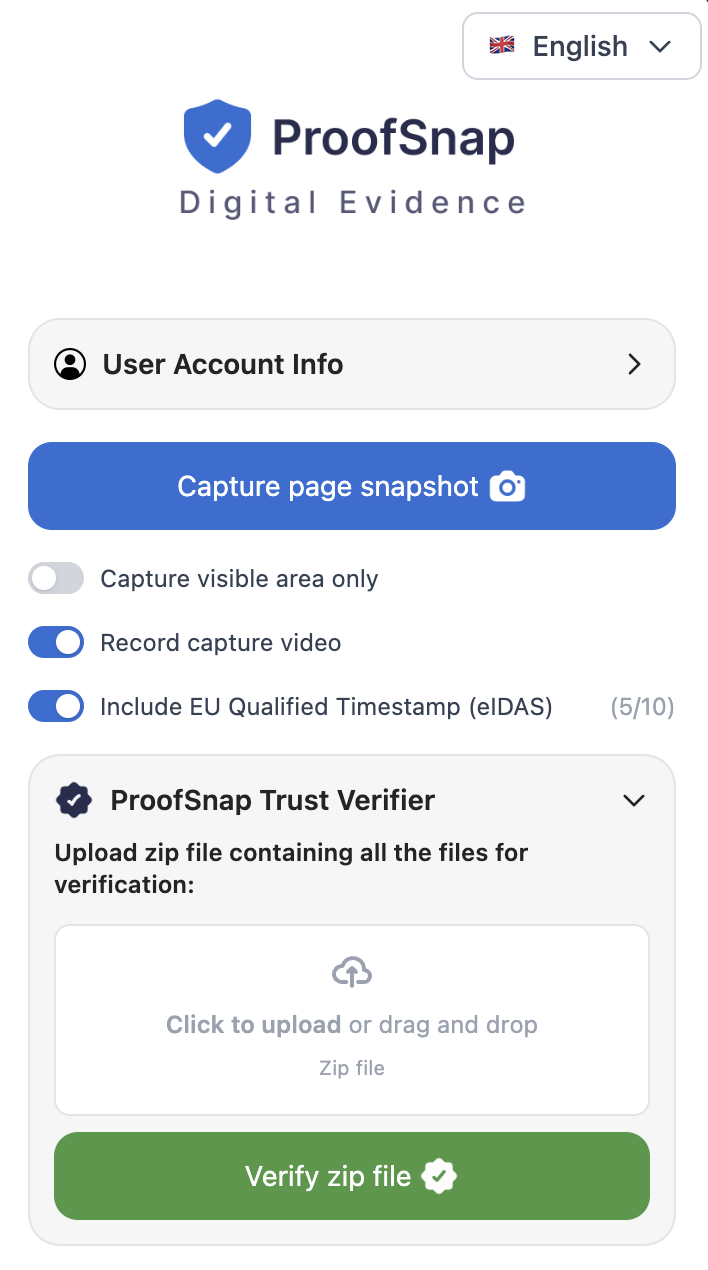
The side panel, actual size relative to a browser window.
Capture page snapshot
The one button that does the work. Scrolls and stitches the full page, saves the HTML as served and the DOM text, records the response headers, DNS, WHOIS and TLS, checks the clock against NTP, hashes everything and signs it. About 41 seconds.
Case and examiner details
Optional matter reference and examiner identity, written into the evidence PDF and the chain of custody so the package identifies the file it belongs to without a covering note.
Evidence language
The evidence PDF can be exported in a different language from the interface, which matters when the investigator and the tribunal do not share one. The structured JSON files stay in their standard form for verification tooling.
Whitelabel branding
A toggle, not a professional services engagement. Your logo, color, firm name, address and contact email replace the default header on the evidence PDF. Enterprise, and the administrator on the Company plan.
Record capture video
Records the capture as it happens and puts the recording inside the sealed package, which answers the question of what the operator did between opening the page and producing the file.
EU qualified timestamp
One toggle adds an eIDAS qualified RFC 3161 timestamp from Disig a.s., a Qualified Trust Service Provider on the EU Trusted List. The counter shows the remaining allowance on the plan.
Trust Verifier and File Certifier sit in the same panel. The verifier checks any ProofSnap package, including one somebody else produced, so the receiving side can validate without installing anything of their own. The certifier seals files you already hold, such as an export, a photograph or a PDF, rather than a web page. Nothing here needs configuration before the first capture.
Do not take our word for it
Download a real evidence package and break it yourself.
Every other vendor writing about this topic asks you to book a demo before you can see the deliverable. Here is the actual ZIP. Open it, read the manifest, recompute the hashes, check the signature against the public key, then change one byte in the screenshot and watch the verification fail. That takes about five minutes and tells you more than any demo call.
unzip proofsnap-sample-evidence-package.zip -d sample && cd sample
sha256sum -c <(python3 -c "import json;[print(v+'  '+k) for k,v in json.load(open('manifest.json'))['files'].items()]")
openssl dgst -sha256 -verify publickey.pem -signature manifest.sig manifest.json
bash verification/verify.shThe exact commands are in verification/VERIFICATION_GUIDE.txt inside the ZIP. Nothing in the verification path runs through ProofSnap.
Questions a workers comp desk asks
FAQ
The next post will come down. Seal it first.
Install the extension, capture one public page, open the ZIP and run the verification script yourself. If the package does not do what this page says it does, you have spent nothing but seven days.
Start the 7-day trialCredit card required. Cancel any time during the trial at zero cost. Or buy a $4.99 SnapPack for 10 captures with no subscription and no auto-renewal.
Disclaimer: This page provides general information about preserving publicly available social media content in workers' compensation investigations. It is not legal advice, claims handling advice, medical advice or investigator licensing advice. ProofSnap is not a law firm and does not act as an expert witness. Admissibility of any item, and any decision to continue, reduce or deny benefits, remain with the carrier, counsel, the treating and examining physicians and the adjudicating body on a case-by-case basis. Case citations are provided for orientation and should be read in full before being relied on. Procedure varies substantially by jurisdiction.
Related ProofSnap pages
- Social media evidence for insurance SIU the full carrier and vendor page
- Are screenshots admissible in court? what a court actually examines
- Social media evidence case law 14 decisions with full citations
- How to preserve social media evidence the full preservation workflow
- AI claim photo detection for SIU is the image in the claim generated
- Evidence for law firms self-authentication under FRE 902(14)
- Trust Verifier check any package in the browser