Office action responses
Third-party use evidence for responding to a likelihood-of-confusion or descriptiveness refusal, with the URL and date of each page.
Use: the dashboard for 2 to 50 public URLs at once, the extension for pages behind a login.
For trademark attorneys and paralegals
ProofSnap captures a webpage with the URL and date that USPTO trademark specimen rules require in 2026, printed in a band above the screenshot. It also keeps the HTML, text, DNS, and WHOIS data under a signed manifest, so you can show that the file was not changed. Use it for specimens and TTAB exhibits.
Extension: what you see in your browser, including pages behind a login. Dashboard: public URLs in batches, with matters and Bates numbering.
The 7-day trial requires a credit card. The dashboard includes 50 test captures with no card. For a single case, a SnapPack is $4.99. Download a sample package (a third-party use page, 17 MB, with optional page images and video).
https://www.example.com/product/3405
2026-11-04T15:00:23Z (UTC) NTP offset +135 ms
ID ps_7f3a9c10-52be-4d61-9a47-1c8e0b6d2f35
KORVANTA Trail Backpack, 30 L
$49.00
Add to cartMock-up of a screenshot from a package. Example Supply Co., its address and the KORVANTA mark are fictional.
Radim Motycka, founder and lead engineer of ProofSnap, responsible for the manifest signature, chain of custody and timestamp integration · · ProofSnap is an evidence tool and does not provide legal advice
A screenshot without its URL and date creates extra work later. The same two facts come up across prosecution, TTAB proceedings, and post-registration audits.
“A web page must include the URL and access or print date.”
Applies when a webpage serves as the specimen for an application, statement of use, or maintenance filing.
“so long as the date the internet materials were accessed and their source (e.g., URL) are provided.”
Applies to internet materials offered in a TTAB proceeding under a notice of reliance.
In a post-registration audit, the USPTO lists screenshots of webpages with the URL and access or print date as proof of use.
A third-party page can change between the watch notice and the letter. ProofSnap records it the day you find it, so the file holds the page as it stood.
Third-party use evidence for responding to a likelihood-of-confusion or descriptiveness refusal, with the URL and date of each page.
Use: the dashboard for 2 to 50 public URLs at once, the extension for pages behind a login.
A notice flags a similar mark on a website or a marketplace. Before anyone evaluates it, capture the listing with the mark, the goods, the seller details, and the URL.
Use: the extension, in the browser you already work in.
Show how a mark appears in the market, or whether a registrant still uses it. Capture each page as you go, including pages that appear only after you sign in.
Use: the extension for pages behind a login. The dashboard takes 2 to 50 public URLs at once.
The evidence in a petition can include screenshots from your nonuse investigation. Capture each page with its URL and date as you go.
Use: either product, but the extension for pages behind a login.
Once a letter goes out, the other side can edit the page. Capture it first, so the letter and the file refer to the same content.
Use: the extension for the single page. On a Legal plan, import the package into the matter and place a legal hold.
Record what the website at a disputed domain name displays before the registrant changes it. The package also contains DNS and WHOIS data. The UDRP evidence guide covers the proceeding itself.
Use: either product, since websites at disputed domain names are usually public.
Five steps from the live page to a specimen that meets the URL and date requirement.
Open the right page
Show the mark together with the goods or services, and a means of ordering goods sold online, such as an add-to-cart button.
Check the layout
Keep the mark, the price, and the order button in view when you capture.
Capture
The band adds the URL and the capture time in UTC above the page.
Fill in the form
Enter the same URL and date in the Trademark Center or TEAS form, and check the date against the UTC time.
File and keep
File the image or PDF, and keep the signed ZIP as your record.
Internet materials can come in under a notice of reliance when the access date and source are provided. They can be used for what they show on their face, and the Board requires all pages to be clear and legible.
Exhibit 3
PS-000014
Illustrative exhibit page with fictional data. Bates numbers and the exhibit sticker come from the matter export.
Most trademark work needs only one. The extension captures what you see in your browser. The dashboard adds batches and matters. They have separate accounts, plans, and billing.
| Task | Extension | Dashboard and API |
|---|---|---|
| Specimen, watch hit | Yes | Public pages |
| Marketplace or social media, behind a login | Yes | No |
| Batch of public pages | One page at a time | 2 to 50 URLs |
| Recurring captures on a schedule | No | Yes, each run counts as a capture |
| Matter, Bates numbering, exhibit index | No | Legal plans |
Product 1
Captures what you see in your own browser, including pages behind a login.
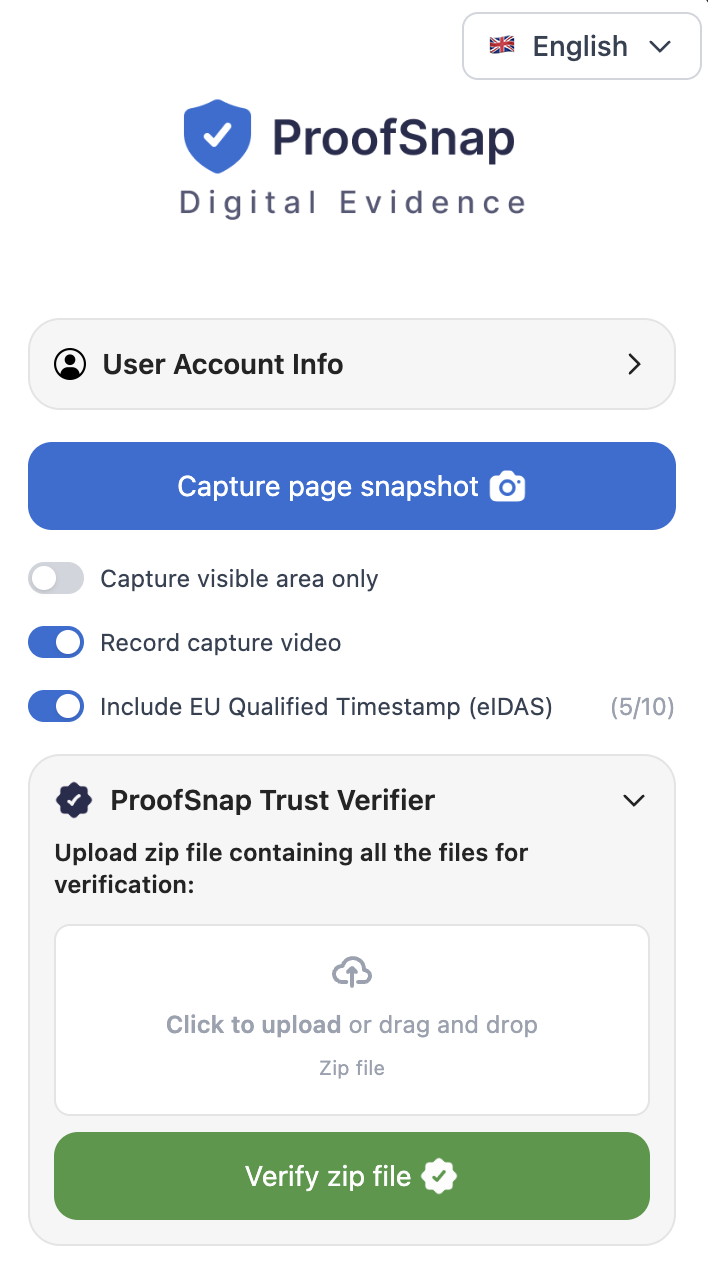
Example account. Options shown depend on the plan or SnapPack.
Product 2
Nothing to install. Our servers load public pages, one URL or a batch, and your matters stay in one place.
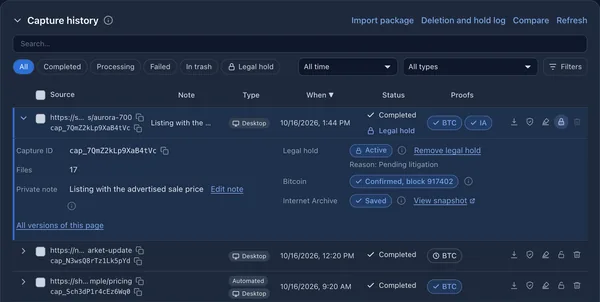
Capture history. Example account.
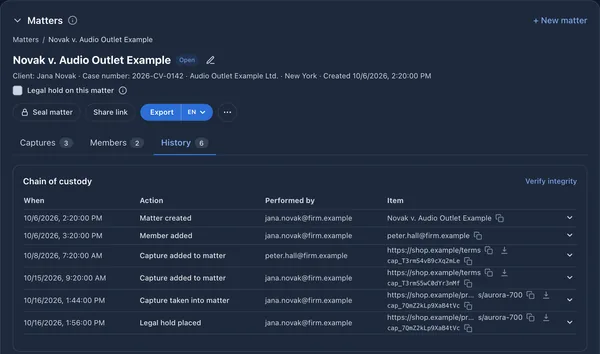
Example account with two users, which requires Legal Company. Legal Solo has one user.
The ProofSnap evidence package from the extension contains 11 to 15 files depending on the plan, with SHA-256 hashes in an RSA-signed manifest, and DNS and WHOIS data. On SnapPacks and on the Professional plan and above, an OpenTimestamps proof shows the data existed no later than the confirmed time. An EU qualified timestamp is optional.
evidence.pdfscreenshot.jpegpage.htmlmanifest.jsonchain_of_custody.json
If a dispute moves to federal court, turn on the option in the extension, on any plan, and the package includes a template for a certification under Fed. R. Evid. 902(13) and (14). It fills in the facts of the capture. The declarant adds identity and qualifications, and signs.
One case: SnapPack. Regular filings: Professional. Bates numbering and matters: a Legal plan, on a separate account.
Product 1
One case
$4.99one-time
10 captures that never expire. No subscription.
Add to Chrome and buy the pack thereDaily work
$16.99per month
200 captures a month for specimens, watch hits, and investigations. 7-day trial, credit card required.
Start the trial in the extensionYour letterhead
$28.99per month
Unlimited captures, with your firm logo and details on the report. For a team, Company is $18.99 per seat, minimum two seats.
Add to ChromeProduct 2
Try it
$050 test captures
No card. Complete packages with a watermark, not for filing.
Open the sandboxSolo attorney
$49per month, or $490 a year
One user, 50 captures a month, then $1.99 each. Matters, export and up to three active schedules or watches.
Choose in the dashboardFirm
$49per seat per month, minimum two seats
100 captures per seat per month, then $1.99 each. Seats, invitations, and member limits.
Choose in the dashboardNo time to do it yourself? Our evidence capture service handles the capture for you from $44.99 per URL, delivered within 48 hours.
Yes. The USPTO rule on specimens says a webpage must include the URL and access or print date. USPTO guidance accepts them on the specimen itself or in the dedicated form fields. A webpage showing a photograph of the mark on the goods or packaging does not need them.
A real example of how you use the mark in commerce, filed with the USPTO. For goods sold online, that is often a webpage showing the mark, the goods, and a means of ordering them.
A product page with the mark next to the goods, a price, and an add-to-cart button, with the URL and date on the image. The sample package on this page shows a real product page captured this way.
A screenshot without the URL and the access or print date, and any mock-up, printer’s proof, or digitally created or altered image, according to USPTO specimen guidance.
It must show the mark as used in selling or advertising the services, with a direct association between the mark and the services. A webpage works the same way, with the URL and date.
Yes, a substitute specimen, with a verified statement that it was in use in commerce by the date the rule requires. Capture the page as it stands, and keep the record of when it was captured.
In a band above the screenshot, with the capture time in UTC. The extension adds it to every capture, the dashboard adds it by default, and the API adds it when the request sets url_stamp to true. The same URL and time appear in evidence.pdf.
Yes. Enter the same URL and date in the form, so the record is consistent. The band shows UTC, so check that the date you enter matches it.
File a PDF, and keep the ZIP as your record. TTAB filings take PDF attachments, so convert screenshot.jpeg to PDF for the exhibit. The ZIP contains the signed record behind it.
Capture the part of the page that matters, and keep the mark, the price, and the order button in view. The Board requires all pages to be clear and legible, and allows 6 MB per file and 53 MB in total.
A capture shows the page on the day you captured it. For an earlier version of the page, use an archive copy together with witness testimony. This is why it pays to capture a page as soon as it matters.
Under a notice of reliance, internet materials can be used for what they show on their face, not for the truth of what they say. For that, plan on witness testimony.
Printing to PDF gives you a URL and a date. ProofSnap also keeps the page HTML, text, DNS, and WHOIS data under a signed manifest, so you can show later that the file was not changed.
They answer different questions. The Wayback Machine shows what a page looked like in the past and usually needs witness testimony. ProofSnap records the page as it stands today, in a package you control. The dashboard can also request an Internet Archive copy at capture time.
Yes, with the extension, because it records what you see in your own browser. The dashboard and the API load public pages from our servers.
A qualified person. The template is built for federal court. In the extension it fills in the facts and leaves the identity, qualifications, and signature of the declarant blank.
From the matter export in the dashboard, on the Legal Solo and Legal Company plans. The export contains Bates-stamped exhibits, an exhibit index, and a custody report.
No. They are two products with separate accounts, plans, and billing. A package from the extension can be imported into a matter on a Legal plan.
Use the extension for the page in your browser and the dashboard for matters and batches of public pages.
Ready to capture?
Install the Chrome extension and capture your first page today.
Start 7-day free trial →Credit card required. Cancel by day 7 at no cost.